
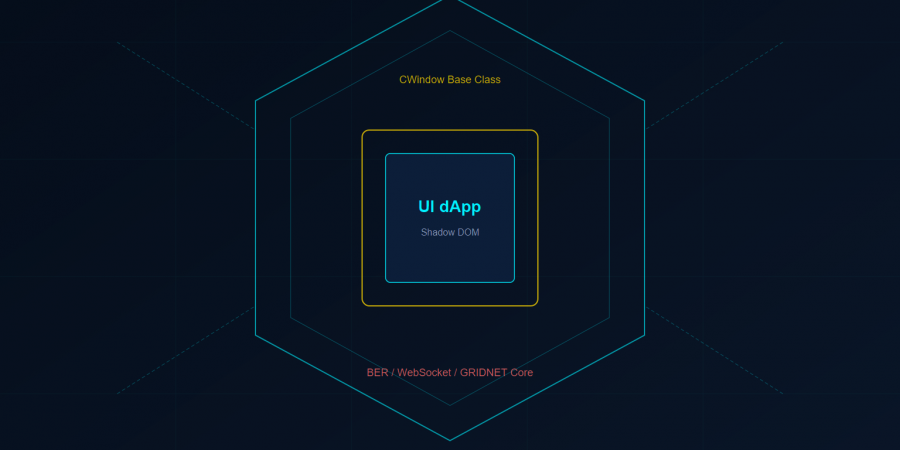
Every application you have ever built on the traditional web sits naked in a shared environment. Your JavaScript runs in the same global scope as third-party analytics. Your CSS bleeds into neighboring widgets. Your DOM is one document.querySelector away from being read — or rewritten — by code you never wrote and never audited. You accepted this because you had no choice.GRIDNET OS gives you a choice.This article disassembles the architecture of a GRIDNET OS UI dApp down to its bolts. By the end, you will understand every layer — from the Shadow DOM fortress that isolates your interface, through the BER-encoded protocol that connects your browser to a decentralized virtual machine, to the lifecycle hooks that let you build applications as robust as the Wallet, Terminal, and Messenger that ship with the platform. This is not a tutorial. This is a blueprint.
I. The Shadow DOM Fortress — Why Isolation Matters
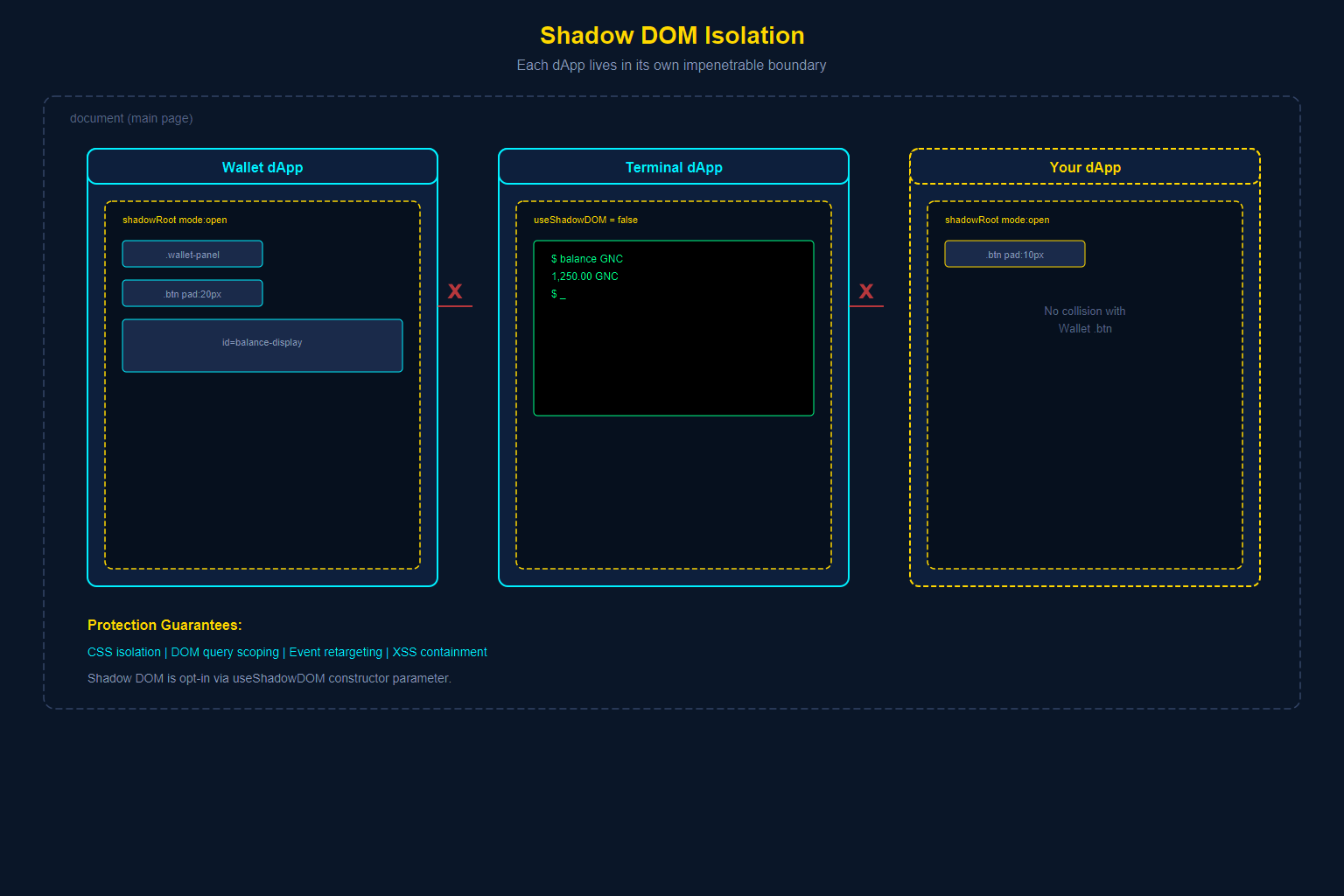
When you build a UI dApp for GRIDNET OS, your application does not live in the main document. It lives inside a Shadow DOM — a browser-native isolation boundary that creates a miniature, self-contained document within the larger page. Shadow DOM is opt-in: the CWindow constructor accepts a useShadowDOM parameter that controls whether your dApp gets a shadow root or a regular DOM container. The Wallet enables it for full CSS encapsulation; the Terminal disables it because xterm.js manages its own rendering. For most dApps with custom CSS, Shadow DOM is the recommended default.
How the Shadow DOM is Created
Every UI dApp extends the CWindow base class. When a window is constructed, the platform creates a DOM element for the window frame, then attaches your application’s HTML into either a Shadow DOM or a regular DOM container, depending on the useShadowDOM constructor parameter:
// From window.js — the moment of isolation
if (this.getUseShadowDOM) {
    let shadow = innerBody.attachShadow({ mode: 'open' });

    let shadowContainer = $('<div/>', {
        html: "<input type='hidden' id='windowIDField' value=" + this.mID + "> "
              + this.mInnerBodyHTML,
        "class": "shadowContainer idContainer",
        "style": "width: 100%; height: 100%;"
    })[0];

    shadow.appendChild(shadowContainer);
} else {
    $(innerBody).html(this.mInnerBodyHTML);
}
That call to attachShadow({ mode: 'open' }) is where the fortress walls go up. From this moment forward:CSS isolation is absolute. Styles defined inside your Shadow DOM cannot leak out to affect other dApps. Styles defined outside — including those from other dApps or the platform shell — cannot reach in. Your .btn class will never collide with another dApp’s .btn class. This is not achieved through naming conventions or CSS modules; it is enforced by the browser engine itself.DOM queries are scoped. A call to document.querySelector('.wallet-panel') from outside your dApp will return null, even if your dApp contains elements with that class. The only way to reach elements inside a Shadow DOM is through the shadow root reference, which the platform controls.Event propagation is re-targeted. Events that originate inside your Shadow DOM are re-targeted when they cross the shadow boundary, making the shadow host appear as the event target rather than the actual internal element. This prevents other code from deducing your internal DOM structure by listening to events.
What It Protects Against
The Shadow DOM protects against an entire category of problems that plague traditional web applications:Cross-dApp CSS pollution. On a traditional page, if two widgets both define .container { padding: 20px }, one wins and the other breaks. In GRIDNET OS, each dApp’s styles are invisible to every other dApp.DOM manipulation attacks. A malicious or buggy dApp cannot reach into your Shadow DOM to read form values, inject elements, or modify your interface. The browser enforces this boundary at the engine level.Global namespace collisions. Each Shadow DOM is its own document fragment. IDs that must be unique within a document only need to be unique within your shadow tree. You can safely use id="terminal" without worrying that the Terminal dApp already claimed that ID.XSS cross-contamination. Even if another dApp on the same page suffers an XSS vulnerability, the attacker’s injected script cannot traverse Shadow DOM boundaries to reach your application’s internals.
Querying Inside the Shadow DOM
Because standard document.querySelector cannot penetrate Shadow DOM boundaries, the CWindow base class provides helper methods:
// Query a single element inside your Shadow DOM
shadowQuery(selector) {
    return this.getBody.querySelector(selector);
}

// Query all matching elements
shadowQueryAll(selector) {
    return this.getBody.querySelectorAll(selector);
}
The getBody property returns your dApp’s content root. When Shadow DOM is enabled, it returns the .shadowContainer element inside the shadow root. When Shadow DOM is disabled, it returns the #windowBody element directly. All DOM operations within your dApp should use these methods (or this.getBody.querySelector directly) rather than document.querySelector.In practice, the most common DOM access pattern is the getControl(controlID) method, which uses jQuery’s .find() internally to locate elements by ID within your window’s scope:
getControl(controlID) {
    if (controlID == null) return null;
    if (this.isElement(controlID)) return controlID;
    let results = $(this.getBody).find('#' + controlID);
    if (results.length == 0) return null;
    return results[0];
}
The Wallet dApp uses getControl() extensively. Both approaches — shadowQuery() and getControl() — respect isolation boundaries.
The Mutation Observer — Your Watchdog
The platform attaches a MutationObserver to every window’s body element:
// From window.js — the observer that watches for DOM changes
const targetNode = this.getBody;
const config = { attributes: false, childList: true, subtree: true };

this.mObserver = new MutationObserver(this.observerCallback.bind(this));
this.mObserver.observe(targetNode, config);
This observer monitors DOM mutations within your dApp. If the mutation rate exceeds a configured threshold (mCurtainThreshold), the platform automatically shows a “curtain” overlay — a loading screen that prevents users from interacting with a partially-rendered interface. This protects against janky UI during heavy DOM operations (like loading hundreds of transaction rows) and automatically hides once the UI stabilizes.
II. The dApp Lifecycle — From Birth to Graceful Death
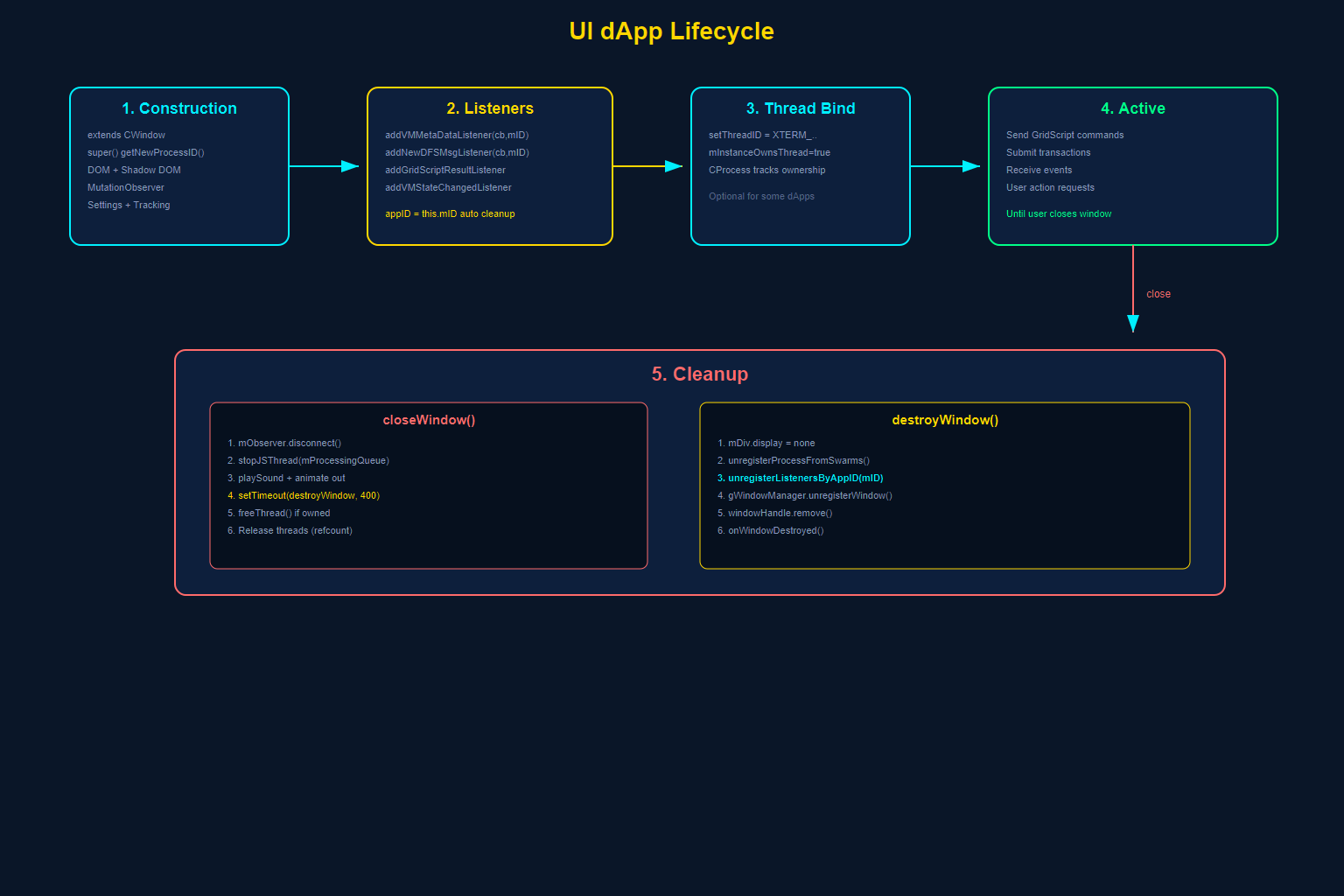
A UI dApp in GRIDNET OS is not simply HTML that gets inserted into a page. It is a managed process with a defined lifecycle that the platform orchestrates. Understanding this lifecycle is essential to building dApps that initialize correctly, communicate with the blockchain, and clean up after themselves without leaking resources.
Phase 1: Construction — The CWindow Base
Every dApp extends CWindow. The constructor is where everything begins:
class CTerminal extends CWindow {
    constructor(positionX, positionY, width, height) {
        super(positionX, positionY, width, height,
              terminalBody,        // Your HTML template
              "Terminal",           // Window title
              CTerminal.getIcon(), // Base64-encoded icon
              false                // useShadowDOM flag
              // Additional optional params: data, dataType, filePath, thread
        );
        // Your initialization code follows...
    }
}
The CWindow constructor performs a remarkable amount of work on your behalf:
- Process registration. Calls
CVMContext.getInstance().getNewProcessID()to obtain a unique process ID. This ID is your dApp’s identity within the platform. - DOM creation. Builds the window frame (title bar, resize handles, min/max/close buttons) and injects your HTML template into the body area.
- Shadow DOM attachment. If
useShadowDOMis true, creates an isolated shadow root (as described above). - Mutation observer setup. Attaches the MutationObserver to detect DOM churn.
- Settings integration. Connects to
CSettingsManagerfor persisting user preferences. - Request tracking initialization. Sets up internal maps for tracking network requests, DFS operations, and VM metadata exchanges.
Phase 2: Listener Registration — Subscribing to the Decentralized World
After the super() call completes, your dApp registers for the events it cares about. This is the most critical phase for connecting to blockchain state. Here is how the Terminal dApp does it:
// From Terminal.js — registering for platform events
CVMContext.getInstance().addVMMetaDataListener(
    this.newVMMetaDataCallback.bind(this), this.mID
);
CVMContext.getInstance().addNewDFSMsgListener(
    this.newDFSMsgCallback.bind(this), this.mID
);
CVMContext.getInstance().addNewGridScriptResultListener(
    this.newGridScriptResultCallback.bind(this), this.mID
);
CVMContext.getInstance().addNewTerminalDataListener(
    this.newTerminalDataCallback.bind(this), this.mID
);
CVMContext.getInstance().addVMStateChangedListener(
    this.VMStateChangedCallback.bind(this), this.mID
);
Every listener registration follows the same pattern:
CVMContext.getInstance().addXxxListener(callback, appID);
The appID parameter (typically this.mID, which is "window_" + processID) is crucial. It ties the listener to your dApp instance. When your window closes, the platform uses this ID to automatically unregister all your listeners — preventing memory leaks and ghost callbacks.Here is how the platform stores these listeners internally:
// From VMContext.js — listener registration pattern
addVMMetaDataListener(eventListener, appID = 0) {
    const id = ++this.mCallbackHandlerSeqNr;
    this.mNewVMMetaDataListeners.push({
        eventListener,  // Your callback function
        appID,          // Your window ID for cleanup
        id              // Unique listener ID for selective removal
    });
    return id;
}
The returned id can be used for selective removal via unregisterEventListenerByID(id), but in most cases the automatic cleanup on window close handles this.
Available Listener Types
The CVMContext singleton offers a comprehensive set of event subscriptions:
| Listener Method | When It Fires |
|---|---|
addVMMetaDataListener |
VM Meta Data arrives from Core (arbitrary bidirectional communication) |
addNewGridScriptResultListener |
GridScript command execution results are returned |
addNewTerminalDataListener |
Terminal output data arrives from a decentralized thread |
addNewDFSMsgListener |
Decentralized File System messages (commit results, etc.) |
addVMStateChangedListener |
The decentralized VM transitions to a new state |
addConnectionStatusChangedListener |
WebSocket connection state changes (connected, disconnected, etc.) |
addNewKeyBlockListener |
A new Key Block is appended to the chain (PoW leader election) |
addNewDataBlockListener |
A new Data Block is appended (transactions confirmed) |
addUserActionRequestListener |
The platform needs user interaction (password prompt, confirmation, etc.) |
addUserLogonListener |
A user session is established (login completed) |
addNewConsensusActionListener |
Thread updates and consensus notifications |
addSessionKeyAvailableListener |
Encrypted session key is established with the full node |
addVMCommitStateChangedListener |
Commit state transitions (prePending, pending, success, aborted) |
addOperationStatusListener |
Generic operation status updates |
Phase 3: Thread Binding — Connecting to a Decentralized Thread
Many dApps need a dedicated decentralized thread — a live execution context on a GRIDNET Core full node. The Terminal dApp, for example, sets its thread ID early:
this.setThreadID = 'XTERM_THREAD_' + this.getProcessID;
The CWindow base class manages thread ownership through mMainThreadID. If your dApp owns a thread (mInstanceOwnsThread = true), closing the window will automatically free the thread via CVMContext.freeThread(). If multiple dApps share a thread, the reference-counting system in CProcess/CThread ensures the thread is only freed when the last consumer disconnects.
Phase 4: Active Operation
Once initialized, your dApp receives events through the registered listeners and communicates with GRIDNET Core by sending VM Meta Data messages. This active phase continues until the user closes the window.During this phase, your dApp may:
- Send GridScript commands to be executed on the blockchain VM
- Submit pre-compiled transactions for processing
- Query blockchain state (balances, domains, transactions)
- Respond to user action requests from the platform
- Create local JS threads for periodic background tasks
Phase 5: Cleanup — closeWindow and destroyWindow
When the user clicks the close button, the platform calls closeWindow():
// From window.js — the cleanup sequence
closeWindow(shutdownThreads = true, forceShutdownThreads = false) {
    // 1. Disconnect the mutation observer
    this.mObserver.disconnect();

    // 2. Stop any local JS processing threads
    if (this.mProcessingQueue > 0)
        CVMContext.getInstance().stopJSThread(this.mProcessingQueue);

    // 3. Play close sound and animate window out
    this.mVMContext.playSound(eSound.close);
    // ... animation code ...

    // 4. Schedule DOM destruction
    setTimeout(this.destroyWindow.bind(this), 400);

    // 5. Free the main decentralized thread if owned
    if (this.getThreadID.byteLength && shutdownThreads && this.mInstanceOwnsThread) {
        let thread = this.getThreadByID(this.getThreadID);
        if (thread && (!thread.mHasDataCommitPending || forceShutdownThreads)) {
            this.mVMContext.freeThread(this.getThreadID, this.getProcessID);
        }
    }

    // 6. Free additional threads
    for (let i = 0; i < threads.length && shutdownThreads; i++) {
        // ... reference counting and conditional free ...
    }
}
Then destroyWindow() completes the cleanup:
destroyWindow() {
    this.mDiv.style.display = "none";
    let windowHandle = this.mDiv;

    // Unregister from WebRTC swarms
    this.mVMContext.getSwarmsManager.unregisterProcessFromSwarms(this.getProcessID);

    // Remove ALL event listeners registered by this dApp
    this.mVMContext.unregisterEventListenersByAppID(this.mID);

    // Unregister from the window manager
    gWindowManager.unregisterWindow(this);

    // Update visibility state
    this.mVisibilityState = eWindowVisibilityState.closed;

    // Remove DOM element
    windowHandle.remove();

    // Clean up mouse event listeners
    window.removeEventListener('mousemove', this.mMouseCallback1);
    window.removeEventListener('mouseup', this.mMouseCallback2);

    // Notify window manager of destruction
    gWindowManager.onWindowDestroyed(this);
}
The key method is unregisterEventListenersByAppID(this.mID). It iterates through every notification listener array and removes entries whose appID matches your window ID:
// From VMContext.js — automatic listener cleanup
unregisterEventListenersByAppID(appID) {
    this.mSwarmManager.unregisterEventListenersByAppID(appID);

    for (var i = 0; i < this.mNotificationListeners.length; i++) {
        for (var a = 0; a < this.mNotificationListeners[i].length; a++) {
            if (this.mNotificationListeners[i][a].appID == appID) {
                this.mNotificationListeners[i].splice(a, 1); // Remove exactly one element
                a--; // Adjust index after removal
            }
        }
    }
}
// Note: The sibling method unregisterEventListenerByID() follows the same
// pattern and correctly uses splice(a, 1) to remove a single element.
This is why passing this.mID as the appID during listener registration is not optional — it enables automatic garbage collection of your callbacks.
III. Communication Patterns — How the Browser Talks to the Blockchain
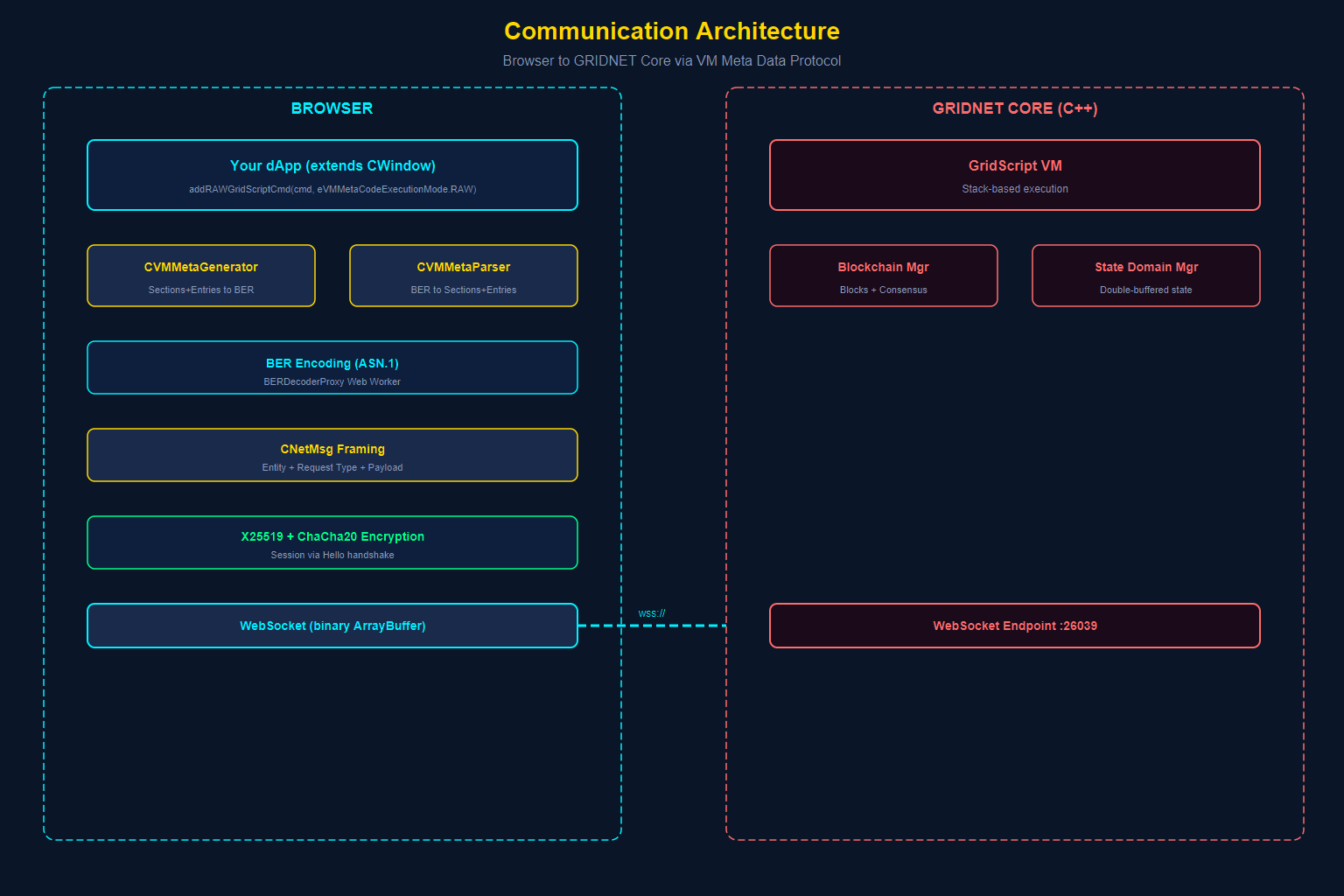
The most fundamental question for any dApp developer is: “How does my JavaScript in the browser communicate with the decentralized virtual machine running on GRIDNET Core?” The answer involves three layers: WebSocket transport, BER encoding, and the VM Meta Data Protocol.
Layer 1: WebSocket Transport
GRIDNET Core exposes a WebSocket endpoint that the browser connects to. The CVMContext singleton manages this connection:
// From VMContext.js — establishing the WebSocket connection
this.mWebSocket = new WebSocket(nodeURI);
this.mWebSocket.binaryType = "arraybuffer";

this.mWebSocket.onopen = this.mOnSocketOpenBoundEvent;
this.mWebSocket.onclose = this.mOnSocketCloseBoundEvent;
this.mWebSocket.onmessage = this.mOnMessageBoundEvent;
this.mWebSocket.onerror = this.mOnErrorBoundEvent;
Key details:
- Binary mode. The socket uses
binaryType = "arraybuffer"— all communication is binary, not text. This is essential because the protocol uses BER encoding. - Automatic reconnection.
CVMContexthas a controller routine that monitors connection health and automatically reconnects if the connection drops. - Session encryption. After the initial handshake, the platform establishes encrypted sessions using X25519 key exchange and ChaCha20 encryption. The
mSessionKey,mEphKeyPair, and AEAD configuration control this. - Connection state tracking. The platform tracks
eConnectionState(disconnected, connecting, connected) and notifies all registeredConnectionStatusChangedListenerson transitions.
Layer 2: BER Encoding — The Wire Format
All data exchanged between browser and Core uses BER (Basic Encoding Rules) from the ASN.1 standard. This is the same encoding used in X.509 certificates, LDAP, and SNMP. GRIDNET chose BER because it provides:
- Schema-less flexibility. Unlike Protocol Buffers or Cap’n Proto, BER does not require pre-compiled schemas. This allows the protocol to evolve without breaking compatibility.
- Nested structure. BER naturally supports nested SEQUENCE and SET structures, which map directly to the hierarchical VM Meta Data format.
- Binary efficiency. No JSON overhead, no base64 bloat. Binary values are transmitted as raw bytes.
The platform includes a dedicated BERDecoderProxy that offloads expensive ASN.1 parsing to a Web Worker, preventing the main thread from blocking:
// From BERDecoderProxy.js — offloading parsing to a Web Worker
this.worker = new Worker('/lib/BERDecoderWorker.js', { type: 'module' });
This is a critical performance optimization. BER decoding of complex structures (like search results containing hundreds of transactions) can take significant CPU time. By running it in a Web Worker, your UI remains responsive.
Layer 3: The VM Meta Data Protocol
The VM Meta Data Protocol is the application-level protocol built on top of BER encoding. It organizes communication into Sections and Entries.A Section (CVMMetaSection) represents a category of communication:
class CVMMetaSection {
    constructor(eType, version = 1) {
        this.mType = eType;      // eVMMetaSectionType enum
        this.mVersion = version;
        this.mEntries = [];       // Array of CVMMetaEntry
        this.mMetaData = new ArrayBuffer();  // Optional section-level metadata
    }
}
Section types include:
eVMMetaSectionType.requests— Outgoing requests to the VM (GridScript commands, data queries)eVMMetaSectionType.notifications— Bidirectional notifications (terminal data, state changes)eVMMetaSectionType.stateLessChannels— Off-chain payment channel operations
An Entry (CVMMetaEntry) is a single operation within a section:
class CVMMetaEntry {
    constructor(eType, reqID, dataFields = [], processID = 0, vmID = new ArrayBuffer()) {
        this.mType = eType;          // eVMMetaEntryType enum
        this.mReqID = reqID;         // Unique request identifier
        this.mProcessID = processID; // Originating dApp process ID
        this.mDataFields = dataFields; // Array of typed data fields
        this.mVMID = vmID;           // Target VM/Thread ID
    }
}
Entry types include:
eVMMetaEntryType.GridScriptCode— A GridScript command to executeeVMMetaEntryType.terminalData— Terminal input/output/resize dataeVMMetaEntryType.dataRequest— A structured data requesteVMMetaEntryType.dataResponse— Response to a user-action requesteVMMetaEntryType.preCompiledTransaction— A locally-compiled transaction
Sending a Command: The Full Flow
Here is the complete flow when your dApp sends a GridScript command:
// Step 1: Create a meta generator
let metaGen = new CVMMetaGenerator();

// Step 2: Add a GridScript command
let reqID = metaGen.addRAWGridScriptCmd(
    "balance GNC",                    // The GridScript command
    eVMMetaCodeExecutionMode.RAW,     // Execution mode (RAW or GUI)
    0,                                 // reqID (0 = auto-generate)
    0,                                 // Window ID
    this.getProcessID,                 // Process ID
    this.getSystemThreadID             // Target thread ID
);

// Step 3: Serialize to BER-encoded bytes
let bytes = metaGen.getPackedData();

// Step 4: Wrap in a network message
let msg = new CNetMsg(
    eNetEntType.VMMetaData,   // Message entity type
    eNetReqType.process,      // Request type
    bytes                     // BER-encoded payload
);

// Step 5: Send over the WebSocket
CVMContext.getInstance().sendNetMsg(msg);
The response arrives asynchronously through your registered VMMetaDataListener or GridScriptResultListener, correlated by the reqID.
CNetMsg — The Network Message Wrapper
Every message sent over the WebSocket is wrapped in a CNetMsg:
let msg = new CNetMsg(eNetEntType.VMMetaData, eNetReqType.process, data);
msg.setDestinationType = eEndpointType.VM;  // Destination is the VM
msg.setDestination = threadID;               // Specific thread to target
The sendNetMsg() method in CVMContext handles authentication, encryption (if a session key is established), commit-state checks, and transmission. Internally, the actual WebSocket write is delegated to sendBinary(), which performs the connection-state safety checks:
// From VMContext.js — the two-method send chain (simplified)
sendNetMsg(msg, breakCommit = false, UINotifyOnError = false, doPreProcessing = true) {
    // 1. Authentication and encryption (if doPreProcessing)
    // 2. Commit-state checks (can this message break a pending commit?)
    // 3. Serialize and delegate to sendBinary()
    var serializedNetMsg = msg.getPackedData();
    return this.sendBinary(serializedNetMsg);
}

sendBinary(message) {
    if (!this.mWebSocket) return false;
    if (this.mWebSocket.readyState !== WebSocket.OPEN) return false;
    this.mWebSocket.send(message);
    return true;
}
Pre-Compiled Transactions — The Local Path
For value transfers and smart contract operations, GRIDNET OS supports local transaction compilation. Instead of sending raw GridScript text to the Core for compilation, your dApp can compile transactions locally using the GridScriptCompiler and CTransaction classes:
// From MetaData.js — adding a pre-compiled transaction
addPreCompiledTransaction(txData, reqID = 0, processID = 0, vmID = new ArrayBuffer()) {
    let section = new CVMMetaSection(eVMMetaSectionType.requests);
    let dataFields = [];
    dataFields.push(gTools.convertToArrayBuffer(txData));

    let entry = new CVMMetaEntry(
        eVMMetaEntryType.preCompiledTransaction, reqID, dataFields, processID, vmID
    );
    section.addEntry(entry);
    return reqID;
}
Local compilation is trustless — the full node validates the transaction bytecode against the same rules regardless of where it was compiled. The Wallet dApp uses this extensively for value transfers, providing a faster user experience since compilation happens instantly in the browser rather than waiting for a round-trip to the Core.
IV. State Management — Tracking the Blockchain
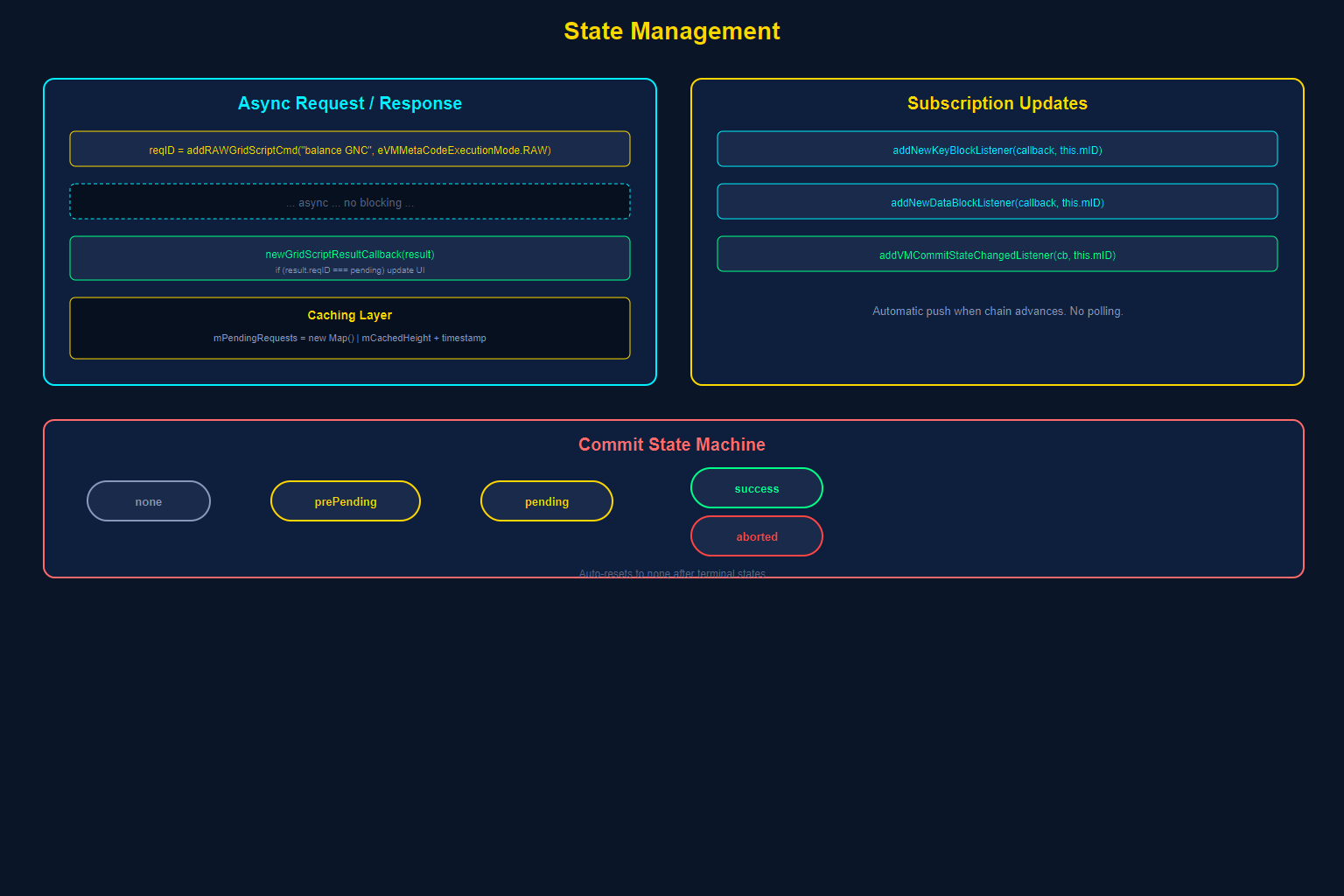
Blockchain state is fundamentally different from traditional application state. It is global (shared across all nodes), eventually consistent (blocks take time to propagate), and immutable once confirmed. Your dApp must be designed to handle these realities.
The Request/Response Model
All blockchain queries follow an asynchronous request/response pattern mediated by request IDs:
// 1. Send a query — get back a request ID
let reqID = metaGen.addRAWGridScriptCmd("balance GNC", eVMMetaCodeExecutionMode.RAW);

// 2. The response arrives later through your listener
newGridScriptResultCallback(result) {
    // result contains the reqID for correlation
    if (result.reqID === this.mPendingBalanceRequestID) {
        this.updateBalanceDisplay(result);
    }
}
This is event-driven architecture at its core. Your dApp sends a request, stores the reqID, and matches it when the response arrives. There is no blocking. There are no Promises wrapping synchronous operations. The decentralized world is inherently asynchronous, and the architecture embraces this.
Blockchain Explorer API — Structured Queries
For common blockchain queries, the CVMContext provides a higher-level API with structured request tracking:
// From VMContext.js — pending request infrastructure
this.mPendingRequests = new Map(); // Maps request IDs to {resolve, reject, type, timer}
this.mCachedHeight = undefined;
this.mCachedKeyHeight = undefined;
this.mCachedHeightTimestamp = 0;
The caching layer prevents redundant queries. Block height, for example, is cached with a timestamp and only re-fetched when stale.
Subscription-Based Updates
For data that changes over time (new blocks, transaction confirmations), the platform supports subscription-based updates:
// From VMContext.js — subscription infrastructure
this.mBlockchainSubscriptionThread = 0;
this.mBlockchainSubscriptionActive = false;
this.mBlockchainSubscriptions = [];
this.mBlockchainUpdateHandlers = [];
When you register a NewKeyBlockListener or NewDataBlockListener, you receive automatic notifications whenever the chain advances. This is how the Wallet dApp keeps its balance display current without polling.
State Domain Management
GRIDNET OS organizes blockchain state into State Domains — analogous to user accounts or namespaces. Each domain has:
- A unique identifier (the domain ID)
- A balance (in GNC, the native currency)
- An owner (public key)
- ACL (Access Control Lists) for fine-grained permissions
- A directory structure (like a filesystem) for storing data
Your dApp tracks the current state domain through CVMContext:
// Accessing state domain information
let domainID = CVMContext.getInstance().mStateDomainID;
Double-Buffering Pattern
The GRIDNET Core uses double-buffering for state management internally — maintaining both a “committed” state and a “working” state for pending modifications. The CStateDomainManager in the Core manages this, and the browser-side reflects it through the commit state machine:
// Commit states visible to your dApp
// eCommitState.none      — No commit in progress
// eCommitState.prePending — Commit lock acquired, preparing
// eCommitState.pending    — Commit submitted, awaiting consensus
// eCommitState.aborted    — Commit was aborted
// eCommitState.success    — Commit confirmed on-chain
The commit state automatically resets to none after terminal states (aborted/success), and notifications are dispatched for each transition. Your dApp listens via addVMCommitStateChangedListener.
V. Multi-Instance Architecture — Running Multiple Copies
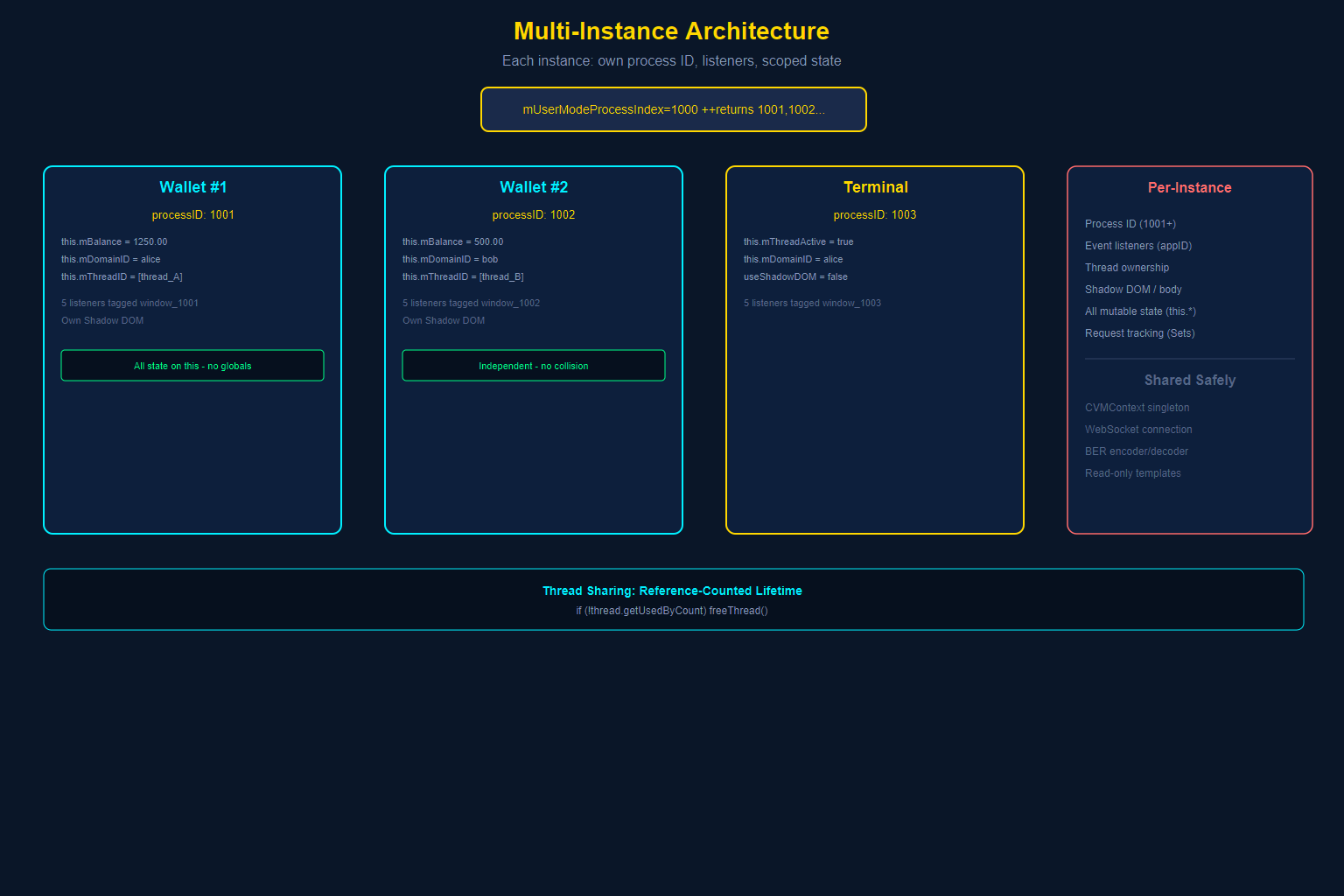
Unlike traditional web applications where there is one instance of your code in one page, GRIDNET OS allows users to open multiple instances of the same dApp simultaneously. Two Wallet windows. Three Terminal sessions. Each must function independently.
How It Works: Process IDs
Every dApp instance receives a unique process ID from the platform:
// From CWindow constructor
this.mProcessID = this.mVMContext.getNewProcessID();
this.mID = ("window_" + this.mProcessID);
The internal counter starts at 1000 and increments before returning, so the first user-mode process ID is 1001. IDs below 1000 are reserved for kernel-mode processes. This ID becomes the namespace for everything the instance owns:
- Event listeners are tagged with
this.mID(which includes the process ID), enabling per-instance cleanup. - Thread ownership is tracked per process. Each instance can own its own decentralized thread.
- DOM elements live in isolated Shadow DOMs (or at minimum, scoped by window ID).
- Settings can be per-instance through the
CSettingsManager.
The No-Globals Rule
For multi-instance architecture to work, your dApp must avoid global state. Consider the Terminal dApp’s approach:
class CTerminal extends CWindow {
    constructor(...) {
        super(...);
        // ALL state is instance properties — never module-level variables
        this.mLastHeightRearangedAt = 0;
        this.mThreadActive = false;
        this.mDomainID = "";
        this.mERGBig = 0;
        this.mBalance = '0';
        this.mFitAddon = null;
        // ...
    }
}
Every piece of state is stored as this.something — an instance property. There are no module-level let or var declarations holding application state (the terminalBody template string is a read-only constant, which is safe to share).The Wallet dApp follows the same pattern across thousands of lines of code — all mutable state lives on this.
Package IDs — Static Identity
While process IDs are unique per instance, every dApp class also has a static getPackageID() method that identifies the dApp type:
static getPackageID() {
    return "org.gridnetproject.UIdApps.terminal";
}
This is used for package management, settings namespacing, and identifying which dApp type is running — not for instance identification.
Thread Sharing Between Instances
When multiple instances need to interact with the same decentralized thread, the platform’s reference-counting system manages thread lifetime:
// From closeWindow — conditional thread release
if (!thread.getUsedByCount && (!thread.mHasDataCommitPending || forceShutdownThreads)) {
    this.mVMContext.freeThread(threads[i].getID, this.getProcessID);
}
A thread is only freed when the last process using it disconnects. This prevents one instance from killing a shared thread that another instance still needs.
VI. Error Handling Patterns — What Breaks and How to Recover
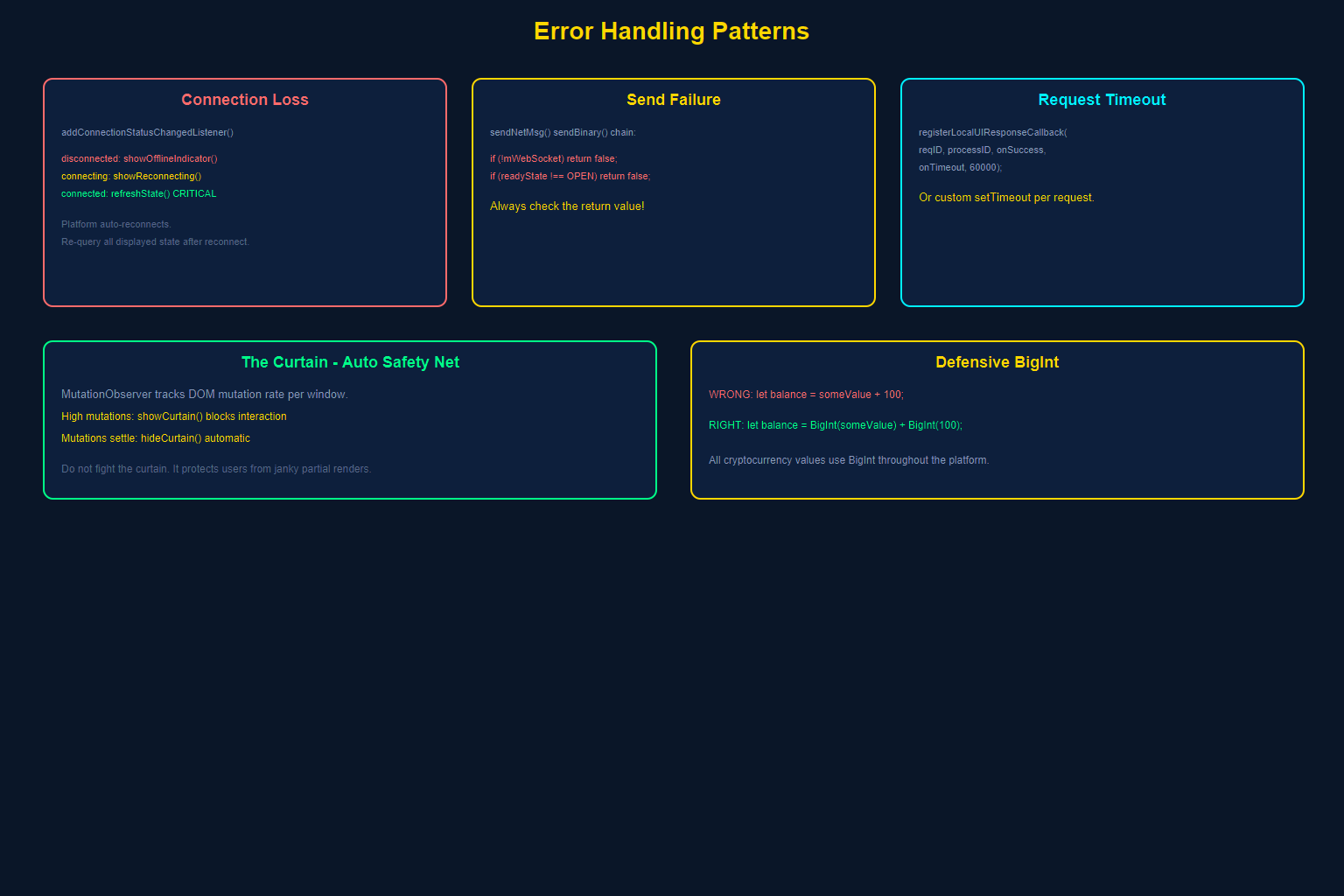
Building on a decentralized platform introduces failure modes that do not exist in traditional web development. The full node may disconnect. A GridScript command may run out of ERG (computational gas). A commit may be rejected by consensus. Your dApp must handle all of these gracefully.
Connection Loss and Recovery
The WebSocket connection can drop at any time. The platform handles reconnection automatically, but your dApp must handle the UI implications:
// Register for connection state changes
CVMContext.getInstance().addConnectionStatusChangedListener(
    this.onConnectionChanged.bind(this), this.mID
);

// Handle state transitions
onConnectionChanged(state) {
    switch(state) {
        case eConnectionState.disconnected:
            this.showOfflineIndicator();
            this.disableTransactionForms();
            break;
        case eConnectionState.connecting:
            this.showReconnectingIndicator();
            break;
        case eConnectionState.connected:
            this.hideOfflineIndicator();
            this.enableTransactionForms();
            this.refreshState(); // Re-query blockchain state
            break;
    }
}
Critical pattern: After reconnection, you must re-query any blockchain state your dApp displays. The world may have changed while you were disconnected. Balances may have shifted. Transactions may have confirmed. Never assume cached state is still valid after a reconnect.
sendNetMsg Failure Handling
The sendNetMsg() method returns false if the message cannot be sent (WebSocket closed, null reference, etc.):
if (!CVMContext.getInstance().sendNetMsg(msg)) {
    // Message was NOT sent — handle gracefully
    this.showNotification('error', 'Message delivery failed',
        'Unable to communicate with the network. Please wait for reconnection.');
    return;
}
Never assume sendNetMsg succeeds. Always check the return value.
Request Timeout Pattern
Responses from the blockchain may never arrive (network partition, node crash). Implement timeout patterns for critical operations:
// The platform provides built-in timeout support for UI tasks
CVMContext.getInstance().registerLocalUIResponseCallback(
    reqID,
    this.getProcessID,
    (response) => { /* success handler */ },
    (error) => { /* timeout/cancel handler */ },
    60000  // 60-second timeout
);
For your own request tracking, implement similar patterns:
sendBalanceQuery() {
    let reqID = /* ... send the query ... */;
    this.mPendingBalanceReqID = reqID;

    // Set a timeout
    this.mBalanceTimeout = setTimeout(() => {
        if (this.mPendingBalanceReqID === reqID) {
            this.mPendingBalanceReqID = null;
            this.showBalanceError('Query timed out');
        }
    }, 30000);
}

onBalanceResult(result) {
    if (result.reqID === this.mPendingBalanceReqID) {
        clearTimeout(this.mBalanceTimeout);
        this.mPendingBalanceReqID = null;
        this.updateBalance(result);
    }
}
Commit State Error Handling
Commit operations (writing to the blockchain) can fail at multiple stages:
CVMContext.getInstance().addVMCommitStateChangedListener(
    this.onCommitStateChanged.bind(this), this.mID
);

onCommitStateChanged(state) {
    switch(state) {
        case eCommitState.prePending:
            this.showCommitProgress('Preparing commit...');
            break;
        case eCommitState.pending:
            this.showCommitProgress('Awaiting consensus...');
            break;
        case eCommitState.success:
            this.showCommitSuccess();
            this.refreshState();
            break;
        case eCommitState.aborted:
            this.showCommitError('Commit was aborted. The transaction may have been rejected.');
            break;
    }
}
The Curtain as a Safety Net
Remember the mutation observer from Section I? It serves as an automatic error recovery mechanism. If your dApp’s DOM gets into a heavy mutation storm (perhaps due to an error in a rendering loop), the curtain activates automatically, preventing the user from interacting with a broken interface:
// The platform calculates mutation rate
// If mutations exceed mCurtainThreshold within mObsTimeWindow:
this.showCurtain(true, false, false, 'High mutation rate detected');

// Once mutations settle, the curtain hides automatically
await this.waitTillUIResponsive();
this.hideCurtain();
Defensive BigInt Handling
GRIDNET OS uses BigInt extensively for cryptocurrency values (balances, transfer amounts, ERG costs). Common pitfall:
// WRONG — will throw TypeError
let balance = someValue + 100;

// RIGHT — BigInt arithmetic requires BigInt operands
let balance = BigInt(someValue) + BigInt(100);

// Also watch for comparisons
if (this.mPendingTotalValueTransfer >= BigInt(value)) {
    this.mPendingTotalValueTransfer -= BigInt(value);
}
The platform uses BigInt wrappers consistently, as seen in CVMContext:
incTotalPendingOutgressTransfer(value) {
    this.mPendingTotalValueTransfer += BigInt(value);
}
VII. Security Model — What the Sandbox Gives You
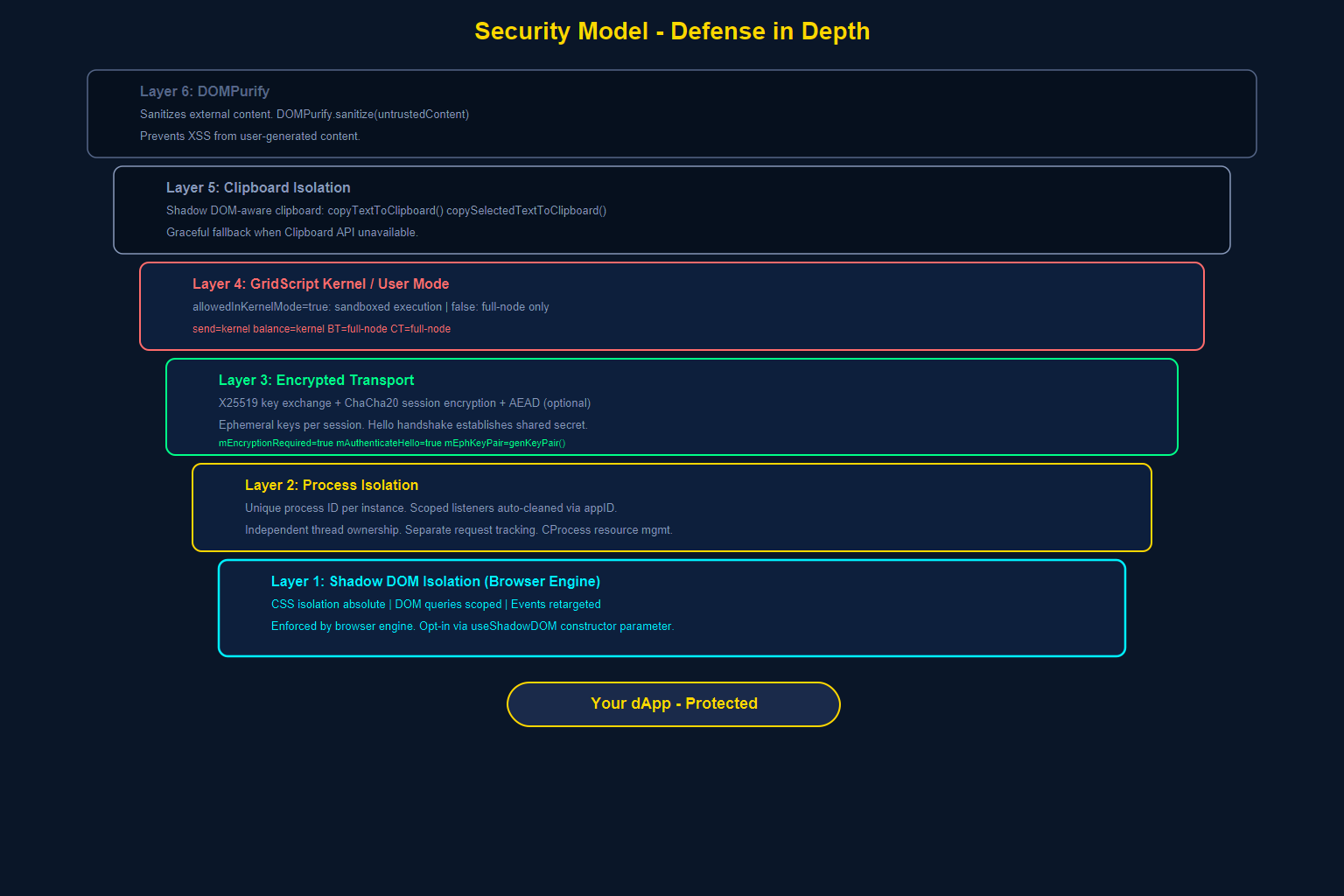
The security architecture of GRIDNET OS UI dApps operates at multiple levels. Understanding each level helps you build dApps that are secure by default and hardened by design.
Layer 1: Shadow DOM Isolation (Browser Level)
As covered in Section I, the Shadow DOM provides:
- CSS isolation — no style bleed in or out
- DOM isolation — no external querySelector access
- Event retargeting — internal structure not discoverable via events
This is your first line of defense against cross-dApp interference.
Layer 2: Process Isolation (Platform Level)
Each dApp instance runs as a separate process with:
- A unique process ID
- Scoped event listeners (automatically cleaned up)
- Independent thread ownership
- Separate request tracking
The CProcess class in the platform tracks which threads and resources belong to each dApp. When a dApp closes, all its resources are reclaimed.
Layer 3: Encrypted Transport (Network Level)
Communication between browser and Core is encrypted:
// From VMContext.js constructor — security configuration
this.mUseAEADForAuth = false;
this.mUseAEADForSessionKey = false;
this.mSignOutgressMsgs = false;
this.mAuthenticateHello = true;
this.mEncryptionRequired = true;
The platform uses:
- X25519 key exchange for establishing shared secrets
- ChaCha20 for session encryption
- AEAD (Authenticated Encryption with Associated Data) optional for authenticated sessions
- Ephemeral key pairs generated fresh each session (
mEphKeyPair)
Layer 4: GridScript Kernel/User Mode (VM Level)
GridScript codewords are categorized as kernel-mode or non-kernel-mode. The GridScriptCompiler.js explicitly tracks this:
// From GridScriptCompiler.js — codeword definitions
// Format: [name, allowedInKernelMode, inlineParams, hasBase58, hasBase64]
['BT', false, 0, false, false],    // Begin Transaction — NON-KERNEL
['CT', false, 0, false, false],    // Commit Transaction — NON-KERNEL
['send', true, 2, false, false],   // Send value — KERNEL
['balance', true, 1, false, false], // Query balance — KERNEL
Codewords marked allowedInKernelMode = true (like send and balance) are included in the kernel-mode compiler — they can execute within the VM’s computational sandbox. Codewords marked false (like BT/Begin Transaction and CT/Commit Transaction) are excluded from the kernel-mode compiler and can only be invoked at the full-node administrative level. This separation prevents sandboxed code from directly triggering top-level state-modifying operations without proper authorization.
Layer 5: Clipboard Isolation
Even clipboard operations are Shadow DOM-aware. The CWindow base class provides isolated clipboard methods:
// Copy text using the modern Clipboard API or fallback
copyTextToClipboard(text) {
    if (navigator.clipboard && navigator.clipboard.writeText) {
        navigator.clipboard.writeText(text);
        return true;
    }
    // Fallback for environments without Clipboard API
    const textarea = document.createElement("textarea");
    textarea.value = text;
    textarea.style.position = "fixed";
    textarea.style.left = "-9999px";
    document.body.appendChild(textarea);
    textarea.select();
    const success = document.execCommand("copy");
    document.body.removeChild(textarea);
    return success;
}
And for reading content from within Shadow DOM:
copySelectedTextToClipboard() {
    if (this.getUseShadowDOM) {
        const body = this.getBody;
        if (body && body.shadowRoot) {
            const selection = body.shadowRoot.getSelection?.() || window.getSelection();
            // ...
        }
    }
}
Layer 6: DOMPurify Integration
The platform includes the purify.js library (DOMPurify) in its standard library. Any user-generated content injected into the DOM should be sanitized:
// Always sanitize external content before injection
element.innerHTML = DOMPurify.sanitize(untrustedContent);
VIII. Real Production Patterns — Annotated Code from Wallet, Terminal, and Messenger
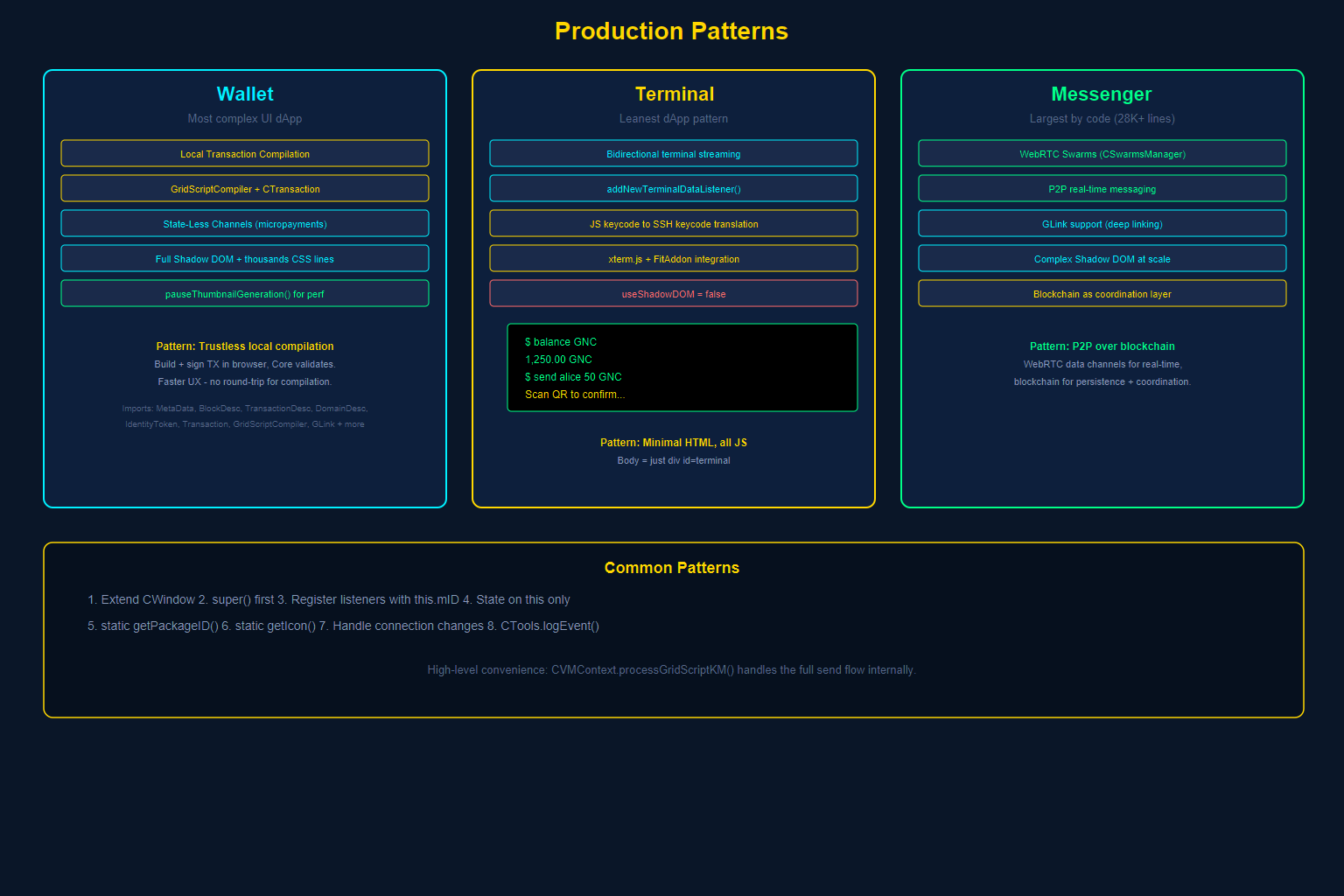
Theory is necessary but insufficient. Let us examine how three production dApps — each with different requirements — implement the patterns described above.
Pattern 1: The Wallet — Complex State with Local Transaction Compilation
The Wallet (wallet.js) is the most complex UI dApp in GRIDNET OS. It demonstrates:Extensive library imports (abbreviated — the Wallet also imports enums, search filters, GLink handlers, drag/drop utilities, and more):
// wallet.js imports — key dependencies
import { CConsensusTask } from "/lib/VMContext.js"
import { CVMMetaSection, CVMMetaEntry, CVMMetaGenerator, CVMMetaParser } from '/lib/MetaData.js'
import { CBlockDesc } from '/lib/BlockDesc.js'
import { CTransactionDesc } from '/lib/TransactionDesc.js'
import { CDomainDesc } from '/lib/DomainDesc.js'
import { CIdentityToken } from '/lib/IdentityToken.js'
import { CTransaction } from '/lib/Transaction.js'
import { GridScriptCompiler } from '/lib/GridScriptCompiler.js'
import { CStateLessChannelsManager, CTokenPoolBank, CTokenPool } from "/lib/StateLessChannels.js"
import { CWindow } from "/lib/window.js"
import { CAppSettings, CSettingsManager } from '/lib/SettingsManager.js'
Key patterns:
- Local transaction compilation. The Wallet imports
GridScriptCompilerandCTransactionto build and sign transactions entirely in the browser, without sending source code to the full node. - State-Less Channels. For off-chain micropayments, the Wallet uses
CStateLessChannelsManager— a sophisticated protocol for instant, zero-fee token transfers. - Rich UI with Shadow DOM. The Wallet’s HTML template includes complete CSS (thousands of lines of cyberpunk-styled components), all encapsulated within the Shadow DOM.
- Thumbnail management. During heavy operations (loading transaction history), the Wallet pauses thumbnail generation platform-wide to preserve performance:
CWindow.pauseThumbnailGeneration().
Pattern 2: The Terminal — Real-Time Bidirectional Streaming
The Terminal (Terminal.js) demonstrates the leanest dApp pattern — a real-time, bidirectional text stream with the blockchain VM:
class CTerminal extends CWindow {
    constructor(positionX, positionY, width, height) {
        super(positionX, positionY, width, height,
              terminalBody, "Terminal", CTerminal.getIcon(), false);

        // Disable vertical scroll (xterm handles its own)
        this.disableVerticalScroll();

        // Instance state — no globals
        this.mThreadActive = false;
        this.mDomainID = "";
        this.mBalance = '0';
        this.mFitAddon = null;

        // Register for ALL relevant events
        CVMContext.getInstance().addVMMetaDataListener(
            this.newVMMetaDataCallback.bind(this), this.mID);
        CVMContext.getInstance().addNewDFSMsgListener(
            this.newDFSMsgCallback.bind(this), this.mID);
        CVMContext.getInstance().addNewGridScriptResultListener(
            this.newGridScriptResultCallback.bind(this), this.mID);
        CVMContext.getInstance().addNewTerminalDataListener(
            this.newTerminalDataCallback.bind(this), this.mID);
        CVMContext.getInstance().addVMStateChangedListener(
            this.VMStateChangedCallback.bind(this), this.mID);

        // Load persisted settings
        this.loadLocalData();

        // Key mapping — JavaScript keycodes to SSH keycodes
        this.mSpecialKeys = new Array(37, 38, 39, 40, 8, 13, 127);
        this.JS_ARROW_UP = 38;
        this.SSH_ARROW_UP = 65;
        // ... more key mappings ...

        CTools.getInstance().logEvent(
            "⋮⋮⋮ Terminal UI dApp launching..",
            eLogEntryCategory.dApp, 1, eLogEntryType.notification, this
        );
    }

    static getPackageID() {
        return "org.gridnetproject.UIdApps.terminal";
    }
}
Key patterns:
- Terminal data protocol. Uses
addNewTerminalDataListenerfor receiving output andCVMMetaGenerator.addTerminalData()for sending input — a dedicated sub-protocol for terminal I/O with support for window dimension negotiation. - Key code translation. Maps JavaScript key events to SSH-compatible key codes, demonstrating how dApps bridge browser APIs to the decentralized VM.
- xterm.js integration. Embeds xterm.js with FitAddon for a fully-functional terminal experience within the window frame.
- Minimal HTML template. The Terminal’s body HTML is remarkably simple — just a
<div id="terminal"></div>with styling. All complexity lives in JavaScript.
Pattern 3: The Messenger — Extended CWindow with Rich UI
The Messenger (Messenger.js) is the largest dApp by code volume, demonstrating how to build a full-featured application:
export class CMessenger extends CWindow {
    static getIcon() {
        // Returns base64-encoded icon
    }
    // ... 28,000+ lines of rich messaging functionality
}
Key patterns:
- WebRTC Swarms. Uses the platform’s
CSwarmsManagerfor peer-to-peer real-time messaging via WebRTC, with the blockchain serving as the coordination layer. - GLink support. The Messenger can be launched via GLinks (GRIDNET deep links) to navigate directly to a conversation or action.
- Complex DOM management. With a rich UI including message lists, contact panels, file sharing, and real-time indicators, the Messenger demonstrates how to manage complex Shadow DOM interactions at scale.
Common Patterns Across All Three
Despite their differences, all three dApps share these foundational patterns:
- Extend CWindow. Every dApp starts with
class MyApp extends CWindow. - Call super() first. The base constructor handles platform registration.
- Register listeners with this.mID. Always pass your window ID for automatic cleanup.
- Store all state on this. No module-level mutable state.
- Use static getPackageID(). Provides a reverse-DNS identifier for the dApp type.
- Use static getIcon(). Returns a base64 icon for the taskbar and window frame.
- Handle connection state changes. React to disconnection and reconnection.
- Use CTools.getInstance().logEvent(). Structured logging that integrates with the platform’s event system.
IX. Complete Architecture Diagram
The following diagram shows the full architectural stack of a GRIDNET OS UI dApp, from the user interface layer down to the blockchain:
X. The dApp Developer’s Checklist
To summarize everything in this article into an actionable checklist:Structure:
- ☐ Extend
CWindow— it is your foundation - ☐ Call
super()with your HTML template, title, icon, and Shadow DOM preference - ☐ Implement static
getPackageID()with a reverse-DNS identifier - ☐ Implement static
getIcon()returning base64-encoded icon data
Lifecycle:
- ☐ Register listeners in the constructor, after
super() - ☐ Always pass
this.mIDas the appID parameter to listener registrations - ☐ Store all mutable state as instance properties (
this.xxx), never as module globals - ☐ Trust the platform’s automatic cleanup on
closeWindow()
Communication:
- ☐ Use
CVMMetaGeneratorto construct outgoing messages - ☐ Track request IDs for correlating responses
- ☐ Always check
sendNetMsg()return value - ☐ Implement timeout patterns for critical requests
Security:
- ☐ Use Shadow DOM (
useShadowDOM = true) for CSS and DOM isolation - ☐ Sanitize any external content with DOMPurify before DOM injection
- ☐ Use
this.shadowQuery()instead ofdocument.querySelector() - ☐ Never expose sensitive data in module-level variables
Resilience:
- ☐ Listen for connection state changes and update UI accordingly
- ☐ Re-query blockchain state after reconnection
- ☐ Use
BigIntfor all cryptocurrency values - ☐ Handle the curtain — do not fight it, it protects your users
The architecture of a GRIDNET OS UI dApp is not a cage — it is an exoskeleton. Every constraint exists to protect you. The Shadow DOM protects your interface. The process model protects your resources. The BER protocol protects your data in transit. The lifecycle hooks protect your users from leaked resources and ghost callbacks. Build within this architecture, and you build something that cannot easily be broken — by bugs, by other dApps, or by the inherent chaos of a decentralized world.This is Part 3 of the GRIDNET OS UI dApp Developer Series. In the next article, we will build a complete dApp from scratch — applying every pattern documented here to create a working application you can deploy to the GRIDNET OS ecosystem.