
Introduction: What “Building Real Things” Means on a Decentralized OS
In the previous articles of this series, you learned the fundamentals: how GRIDNET OS UI dApps are structured, how CWindow gives you an isolated Shadow DOM sandbox, how CVMContext connects your JavaScript to a blockchain-backed virtual machine, and how GridScript commands drive state transitions on the decentralized ledger. You built a “Hello Blockchain” dApp. You explored the CVMContext API in depth.
Now comes the question that separates toy demos from real software: what can you actually build?
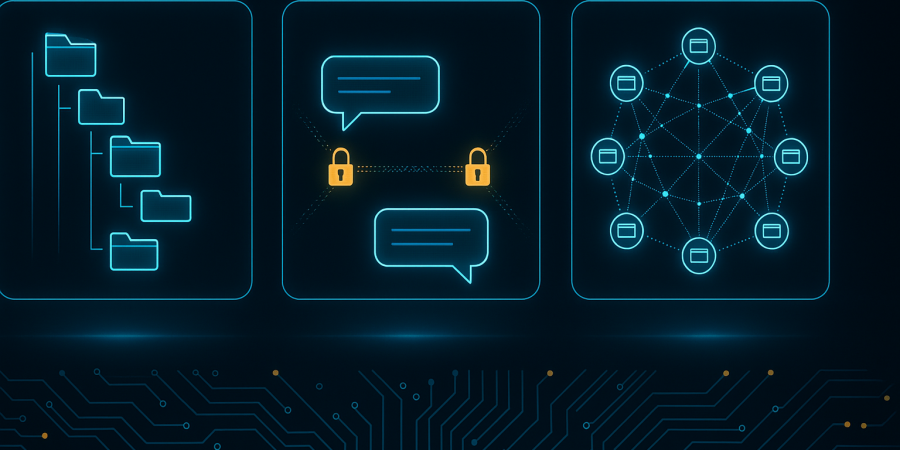
The answer is: quite a lot. GRIDNET OS provides three foundational capabilities that, combined, enable an entire class of applications that would traditionally require servers, databases, cloud storage, and messaging infrastructure:
- A Decentralized File System — create directories, read and write files, navigate paths, commit changes to the blockchain. No Amazon S3. No Firebase. Your files live on the chain.
- Peer-to-Peer Messaging — the built-in Messenger dApp demonstrates direct, encrypted, zero-server communication between browsers using WebRTC data channels. No WhatsApp backend. No Signal server.
- WebRTC Swarms — create multi-peer mesh networks where browsers connect directly to each other for real-time data exchange, audio, video, and screen sharing. The signaling server (a GRIDNET full node) brokers the initial connection; after that, traffic flows peer-to-peer.
This article is your comprehensive reference for all three. Every method signature is taken directly from the source code. Every example is tested against the actual implementation. By the end, you will be able to build a file manager, a messenger, or a collaborative real-time application — from scratch, on a decentralized OS, with no server of your own.
Part I: The Decentralized File System
Architecture Overview
The decentralized file system in GRIDNET OS is not a POSIX file system. It is a blockchain-backed hierarchical data store with directory navigation, file creation, file reading, and atomic commits. Think of it as a version-controlled file system where every commit is a blockchain transaction — immutable, timestamped, and cryptographically secured.
The file system is accessed through the CFileSystem singleton class, defined in /lib/FileSystem.js. You obtain it via:
const fs = CVMContext.getInstance().getFileSystem;
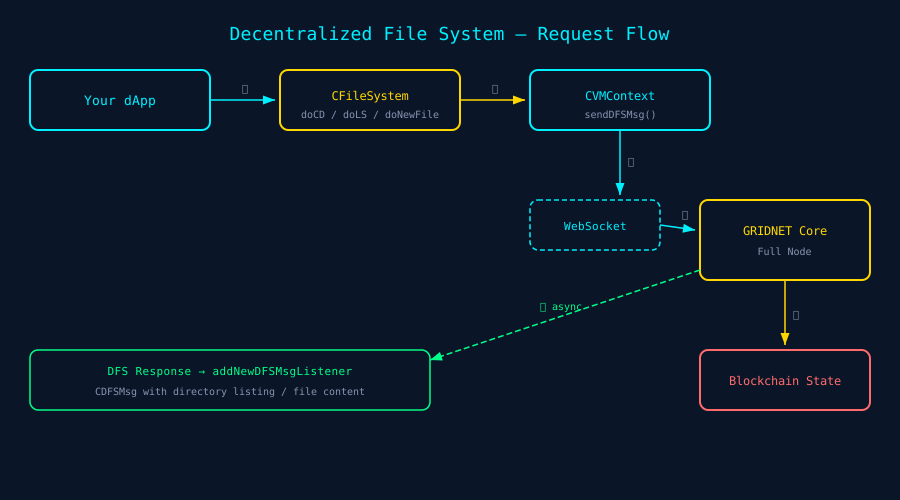
Every file system operation follows the same pattern:
- You call a method on
CFileSystem(e.g.,doCD(),doLS(),doNewFile()). - The method constructs a
CDFSMsg— a DFS (Decentralized File System) message with the appropriate command type. CVMContext.sendDFSMsg()serializes and sends the message over the WebSocket connection to the full node.- The full node processes the command against the blockchain state.
- A response arrives asynchronously via the DFS message listener system.
- You receive results in your registered callback.
The return value of every CFileSystem method is a COperationStatus object — not the file data itself. The actual data arrives asynchronously through listeners. This is the critical mental model: all DFS operations are fire-and-forget commands with async responses.
Thread IDs: The Routing Key
Every file system operation takes an optional threadID parameter. This parameter determines which decentralized thread processes the command. GRIDNET OS uses two primary threads:
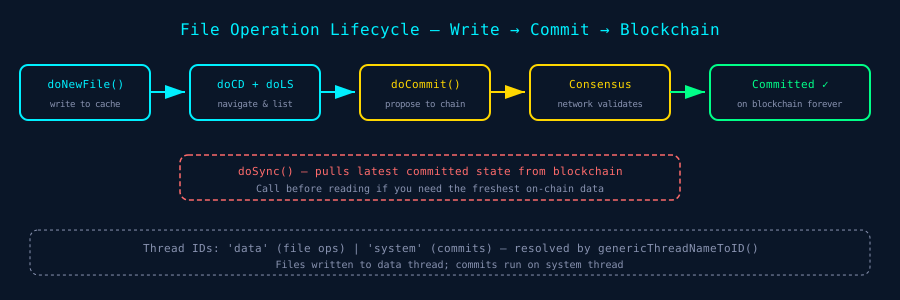
'data'— The data thread, used for file read/write operations. This is the default for mostCFileSystemmethods.'system'— The system thread, used for commit operations and state-changing transactions.
The symbolic thread names ('data', 'system') are resolved to actual ArrayBuffer thread identifiers by CTools.getInstance().genericThreadNameToID(threadID). You can also pass the raw ArrayBuffer thread ID directly — for example, from this.getThreadID in your CWindow subclass, which returns the thread ID assigned to your dApp’s window.
The File Manager dApp demonstrates this pattern throughout: it consistently passes this.getThreadID as the thread ID parameter, ensuring all operations are scoped to that window’s thread context:
// FileManager.js pattern — every operation uses the window's thread ID
CVMContext.getInstance().getFileSystem.doCD(path, true, false, false, this.getThreadID);
CVMContext.getInstance().getFileSystem.doLS(this.getThreadID);
CVMContext.getInstance().getFileSystem.doNewFile(fileName, content, false, this.getThreadID);
CVMContext.getInstance().getFileSystem.doGetFile(filePath, false, this.getThreadID);
CVMContext.getInstance().getFileSystem.doNewDir(dirName, false, this.getThreadID);
API Reference: CFileSystem Methods
doCD(path, doLS, breakCommit, dontThrow, threadID) — Change Directory
Navigates to a directory path on the decentralized file system.
/**
 * @param {string}      path        — Directory path to navigate to (e.g., '/', '/myApp/data')
 * @param {boolean}     doLS        — If true, performs an atomic LS after CD (default: true)
 * @param {boolean}     breakCommit — If true, breaks any pending commit lock (default: false)
 * @param {boolean}     dontThrow   — If true, suppresses fatal errors for missing dirs (default: false)
 * @param {string|ArrayBuffer} threadID — Thread to process on (default: 'data')
 * @returns {COperationStatus}      — Contains getReqID and getIsSuccess
 */
const fs = CVMContext.getInstance().getFileSystem;
const result = fs.doCD('/myApp/data', true, false, false, this.getThreadID);

if (result.getIsSuccess) {
  // Request sent successfully — await async response via DFS listener
  this.addNetworkRequestID(result.getReqID);
}
The doLS parameter is a powerful optimization: when true, the full node performs the directory change and listing as a single atomic operation, saving a round trip. The File Manager uses doCD(path, true, ...) almost exclusively — navigating and listing in one shot.
The dontThrow parameter is important for defensive programming: normally, attempting to cd into a non-existent directory causes a fatal error on the VM. Setting dontThrow = true converts this into a soft error returned via COperationResult.
Internally, doCD constructs a CDFSMsg with command type eDFSCmdType.enterDirLS (or eDFSCmdType.enterDir if doLS is false), sets the path as UTF-8 encoded data, and sends it via CVMContext.sendDFSMsg().
doLS(threadID, breakCommit) — List Directory
Lists the contents of the current directory.
/**
 * @param {string|ArrayBuffer} threadID    — Thread to process on (default: 'data')
 * @param {boolean}            breakCommit — Break pending commit lock (default: false)
 * @returns {COperationStatus}
 */
const result = fs.doLS(this.getThreadID);
this.addNetworkRequestID(result.getReqID);
The directory listing arrives as a CDFSMsg response through your registered DFS message listener. The response contains a serialized representation of the directory’s files and subdirectories.
doNewFile(path, content, breakCommit, threadID) — Create/Write a File
Creates a new file or overwrites an existing one at the specified path.
/**
 * @param {string}             path        — File path (e.g., 'notes.txt')
 * @param {string|ArrayBuffer} content     — File content (text or binary)
 * @param {boolean}            breakCommit — Break pending commit lock (default: false)
 * @param {string|ArrayBuffer} threadID    — Thread to process on (default: 'data')
 * @returns {COperationStatus}
 */
const result = fs.doNewFile('notes.txt', 'Hello, blockchain!', false, this.getThreadID);
this.addNetworkRequestID(result.getReqID);
Important: The file path is automatically quoted by the method if not already wrapped in quotes. The content can be either a JavaScript string (which will be UTF-8 encoded) or a raw ArrayBuffer for binary data. On success, a CConsensusTask is created with description “New File” — this appears in the Magic Button’s pending operations display, informing the user that uncommitted changes exist.
updateFile(path, content, breakCommit, threadID) — Update an Existing File
Updates a file’s content. Unlike doNewFile(), this method checks whether a consensus task for the same file already exists, avoiding duplicate entries in the pending operations list.
/**
 * @param {string}             path        — File path
 * @param {string|ArrayBuffer} content     — New content
 * @param {boolean}            breakCommit — Break pending commit lock (default: false)
 * @param {string|ArrayBuffer} threadID    — Thread (default: 'data')
 * @returns {COperationStatus}
 */
const result = fs.updateFile('notes.txt', 'Updated content', false, this.getThreadID);
doGetFile(path, breakCommit, threadID) — Read a File
Reads the content of a file at the given path.
/**
 * @param {string}             path        — File path to read
 * @param {boolean}            breakCommit — Break pending commit lock (default: false)
 * @param {string|ArrayBuffer} threadID    — Thread (default: 'data')
 * @returns {COperationStatus}
 */
const result = fs.doGetFile('notes.txt', false, this.getThreadID);
this.addNetworkRequestID(result.getReqID);
// File content arrives asynchronously via DFS message listener
doNewDir(path, breakCommit, threadID) — Create a Directory
/**
 * @param {string}             path        — Directory name/path
 * @param {boolean}            breakCommit — Break pending commit lock (default: false)
 * @param {string|ArrayBuffer} threadID    — Thread (default: 'data')
 * @returns {COperationStatus}
 */
const result = fs.doNewDir('myAppData', false, this.getThreadID);
this.addNetworkRequestID(result.getReqID);
doCommit(breakCommit, threadID) — Commit Changes to Blockchain
This is where the magic happens. All file operations (create, update, delete) are initially made in a local staging area — like a Git index. Nothing is permanent until you commit. The doCommit() method proposes all staged changes as a blockchain transaction.
/**
 * @param {boolean}            breakCommit — Break pending commit lock (default: false)
 * @param {string|ArrayBuffer} threadID    — Thread (default: 'system')
 * @returns {COperationStatus}
 */
const result = fs.doCommit(false, 'system');
Critical detail: Note the default thread ID is 'system' for commits, not 'data'. Commits are state-changing operations that must run on the system thread. The commit process involves:
- A commit lock is acquired (preventing other dApps from committing simultaneously).
- Staged changes are bundled into a transaction proposal.
- The full node submits the transaction to the blockchain network.
- Network consensus validates the transaction.
- On success, the changes become permanent and immutable.
The commit state machine has several states tracked by CVMContext: eCommitState.none, eCommitState.prePending, eCommitState.pending, eCommitState.success, eCommitState.aborted. You can listen for commit state changes via CVMContext.getInstance().addVMCommitStateChangedListener().
doSync(breakCommit, threadID) — Synchronize from Blockchain
Pulls the latest committed state from the blockchain, ensuring your local view reflects the most recent on-chain data.
/**
 * @param {boolean}            breakCommit — Break pending commit lock (default: false)
 * @param {string|ArrayBuffer} threadID    — Thread (default: 'system')
 * @returns {COperationStatus}
 */
const result = fs.doSync();
Call doSync() when you need to see the freshest on-chain data — for example, after another user has committed changes, or when your dApp starts up and needs the latest state.
Listening for Responses: The DFS Message Listener Pattern
Since all file system operations are asynchronous, you need to register listeners to receive results. There are two listener mechanisms:
1. DFS Message Listener — Low-Level
// Register a DFS message listener
CVMContext.getInstance().addNewDFSMsgListener(
  function(msg) {
    // msg is a CDFSMsg containing the response
    // Process directory listings, file contents, error codes, etc.
    console.log('DFS Response received:', msg);
  },
  this.getProcessID  // appID — for cleanup when your dApp closes
);
The File Manager dApp registers its listener in the constructor and uses it to process all file system responses — updating the UI with directory listings, displaying file contents, and handling errors.
2. DFS Request Completed Listener — High-Level
CVMContext.getInstance().addDFSRequestCompletedListener(
  function(result) {
    // result contains the operation status and any response data
  },
  this.getProcessID
);
3. Network Request ID Tracking
The CWindow base class provides addNetworkRequestID(reqID), which the File Manager uses extensively to track which requests belong to this window. When a response arrives, the window can check if the response’s request ID matches one it’s tracking:
// Pattern from FileManager.js — fire request and track its ID
const result = CVMContext.getInstance().getFileSystem.doCD(
  path, true, false, false, this.getThreadID
);
this.addNetworkRequestID(result.getReqID);

// Later, in DFS listener callback:
// Check if msg.getRequestID matches one of our tracked request IDs
Complete Worked Example: A Simple File Manager
Here is a complete, runnable dApp that creates a directory, writes a file, reads it back, and commits everything to the blockchain:
"use strict"
import { CWindow } from "/lib/window.js"

const appBody = `
<style>
  .container { padding: 1em; color: #22fafc; font-family: monospace;
    background: linear-gradient(135deg, #0a0a14, #0d1a2d); height: 100%; }
  button { background: #1a3a5c; color: #00f0ff; border: 1px solid #00f0ff;
    padding: 8px 16px; margin: 4px; cursor: pointer; border-radius: 4px; }
  button:hover { background: #00f0ff; color: #0a0a14; }
  #output { margin-top: 1em; white-space: pre-wrap; color: #8892b0;
    max-height: 300px; overflow-y: auto; }
</style>
<div class="container">
  <h2>File System Demo</h2>
  <button id="btnCreate">Create Directory + File</button>
  <button id="btnRead">Read File</button>
  <button id="btnCommit">Commit to Blockchain</button>
  <button id="btnSync">Sync from Chain</button>
  <div id="output"></div>
</div>
`;

class CFileSystemDemo extends CWindow {

  constructor(x, y, w, h) {
    super(x, y, w, h, appBody, "FS Demo", CFileSystemDemo.getIcon(), true);
    this.setThreadID = 'FS_DEMO_' + this.getProcessID;
    this.mVMContext = CVMContext.getInstance();
    this.mFS = this.mVMContext.getFileSystem;

    // Register DFS message listener for responses
    this.mVMContext.addNewDFSMsgListener(
      this.onDFSResponse.bind(this),
      this.getProcessID
    );

    // Bind UI
    this.shadowRoot.getElementById('btnCreate').onclick = () => this.createFileDemo();
    this.shadowRoot.getElementById('btnRead').onclick   = () => this.readFileDemo();
    this.shadowRoot.getElementById('btnCommit').onclick  = () => this.commitDemo();
    this.shadowRoot.getElementById('btnSync').onclick    = () => this.syncDemo();
  }

  static getPackageID() { return "com.demo.fsDemo"; }
  static getIcon() { return '/images/filemanager.png'; }

  log(msg) {
    const el = this.shadowRoot.getElementById('output');
    el.textContent += new Date().toLocaleTimeString() + ' — ' + msg + '\n';
    el.scrollTop = el.scrollHeight;
  }

  createFileDemo() {
    // Step 1: Navigate to root
    let r1 = this.mFS.doCD('/', true, false, false, this.getThreadID);
    this.addNetworkRequestID(r1.getReqID);
    this.log('CD / → reqID: ' + r1.getReqID);

    // Step 2: Create a directory
    let r2 = this.mFS.doNewDir('demoApp', false, this.getThreadID);
    this.addNetworkRequestID(r2.getReqID);
    this.log('MKDIR demoApp → reqID: ' + r2.getReqID);

    // Step 3: Navigate into it
    let r3 = this.mFS.doCD('demoApp', true, false, false, this.getThreadID);
    this.addNetworkRequestID(r3.getReqID);
    this.log('CD demoApp → reqID: ' + r3.getReqID);

    // Step 4: Create a file with content
    let r4 = this.mFS.doNewFile(
      'hello.txt',
      'Hello from the decentralized file system! Timestamp: ' + Date.now(),
      false,
      this.getThreadID
    );
    this.addNetworkRequestID(r4.getReqID);
    this.log('NEW FILE hello.txt → reqID: ' + r4.getReqID);
  }

  readFileDemo() {
    let r = this.mFS.doGetFile('hello.txt', false, this.getThreadID);
    this.addNetworkRequestID(r.getReqID);
    this.log('GET FILE hello.txt → reqID: ' + r.getReqID);
  }

  commitDemo() {
    let r = this.mFS.doCommit(false, 'system');
    this.addNetworkRequestID(r.getReqID);
    this.log('COMMIT → reqID: ' + r.getReqID);
  }

  syncDemo() {
    let r = this.mFS.doSync();
    this.log('SYNC → reqID: ' + r.getReqID);
  }

  onDFSResponse(msg) {
    // This receives ALL DFS responses — filter by request ID
    this.log('DFS Response: type=' + msg.getType + ' reqID=' + msg.getRequestID);
  }

  static getDefaultCategory() { return 'dApps'; }
}

export { CFileSystemDemo };
Part II: Peer-to-Peer Messaging
How the Messenger Works
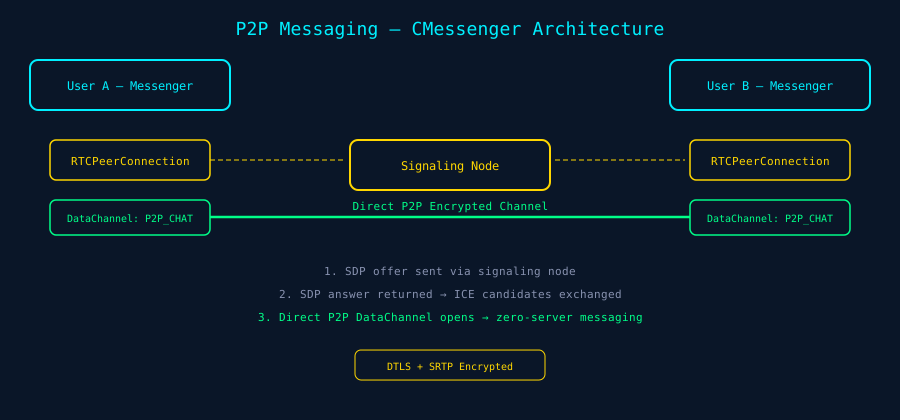
The GRIDNET OS Messenger (CMessenger, defined in /dApps/Messenger.js) is a fully-featured peer-to-peer chat application built on WebRTC. It does not use GRIDNET’s full-node-mediated swarm system for message delivery — instead, it creates a direct RTCPeerConnection between two browsers, with a named DataChannel labelled "P2P_CHAT_CHANNEL_LABEL".
The signaling mechanism uses the GRIDNET full node as a relay for the initial SDP (Session Description Protocol) offer/answer exchange and ICE candidate negotiation. Once the peer-to-peer connection is established, messages flow directly between browsers — encrypted with DTLS — and the signaling node is no longer involved.
Connection Flow
- User A initiates. The Messenger creates a new
RTCPeerConnectionand a DataChannel named"P2P_CHAT_CHANNEL_LABEL". - SDP Offer. An SDP offer is generated via
peerConnection.createOffer()and sent through the GRIDNET signaling node to User B. - User B responds. User B receives the offer, creates their own
RTCPeerConnection, sets the remote description, generates an SDP answer, and sends it back. - ICE Exchange. Both peers exchange ICE candidates through the signaling node via
onicecandidatecallbacks. These candidates contain network path information for NAT traversal. - Direct Connection. Once ICE negotiation succeeds, the
DataChannelopens. Theonopencallback fires, and messages can now be sent directly peer-to-peer. - Message Exchange. Text messages are sent through the
DataChannel.send()method and received viaDataChannel.onmessage.
The Peer Code Pattern
The Messenger uses a peer code system for connection establishment. When User A wants to connect to User B:
- User B generates or shares a peer code (typically derived from their identity or session).
- User A enters this code in the Messenger UI.
- The signaling node routes the SDP exchange based on this code.
This is fundamentally different from centralized messaging where a server stores and forwards messages. Here, the “server” (GRIDNET node) is only a matchmaker — it introduces peers and then steps aside.
Building Your Own P2P Messaging
While the Messenger dApp is a React-based bundled application, you can build your own P2P messaging using the same underlying WebRTC infrastructure. The key components from the GRIDNET OS library are:
// 1. Access the Swarm Manager (which handles WebRTC signaling)
const swarmManager = CVMContext.getInstance().getSwarmsManager;

// 2. Join a swarm (creates a named communication room)
const swarmID = CTools.getInstance().convertToArrayBuffer('my-chat-room');
swarmManager.joinSwarm(
  swarmID,                     // swarm identifier
  new ArrayBuffer(),           // userID (empty = use session identity)
  new ArrayBuffer(),           // privKey (empty = use session key)
  eConnCapabilities.data,      // we only need data channels, not audio/video
  this                         // app instance (CWindow subclass)
);

// 3. Register event listeners on the swarm
const swarm = swarmManager.findSwarmByID(swarmID);
if (swarm) {
  // Listen for incoming messages
  swarm.addMessageEventListener(function(event) {
    console.log('Message from peer:', event);
  }, this.getProcessID);

  // Listen for data channel messages (lower level)
  swarm.addDataChannelMessageEventListener(function(event) {
    console.log('DataChannel message:', event);
  }, this.getProcessID);

  // Listen for peer connection state changes
  swarm.addSwarmConnectionStateChangeEventListener(function(event) {
    console.log('Connection state:', event);
  }, this.getProcessID);

  // Listen for new peer tracks (audio/video)
  swarm.addTrackEventListener(function(event) {
    console.log('New track from peer:', event);
  }, this.getProcessID);

  // Send data to all peers in the swarm
  swarm.sendData(
    CTools.getInstance().convertToArrayBuffer('Hello, swarm!'),
    null,  // null = broadcast to all peers
    true   // only send to authenticated peers
  );

  // Send a structured swarm message
  swarm.sendSwarmMessage(
    messageData,    // CSwarmMsg or raw data
    protocolID,     // application-defined protocol identifier
    true            // only to authenticated peers
  );
}
Message Authentication and Privacy
Swarms support two security modes:
- Open Swarms (
eSwarmAuthRequirement.open) — Any peer can join and participate. Data channels are still encrypted by WebRTC’s built-in DTLS, but there is no application-level authentication. - Private Swarms (
eSwarmAuthRequirement.PSK_ZK) — A pre-shared key is required. Peers must prove knowledge of the key using a zero-knowledge proof (the key image is a SHA3-256 hash with a time-based nonce). Unauthenticated peers receive only dummy tracks (silent audio, black video) until they authenticate.
// Make a swarm private with a shared password
await swarm.setPreSharedKey('my-secret-password');
// This triggers: swarm.authRequirement = eSwarmAuthRequirement.PSK_ZK
// All current peers are required to re-authenticate

// Or via command processor:
await swarm.processCommand('/setkey my-secret-password');
Part III: WebRTC Swarms
What is a Swarm?
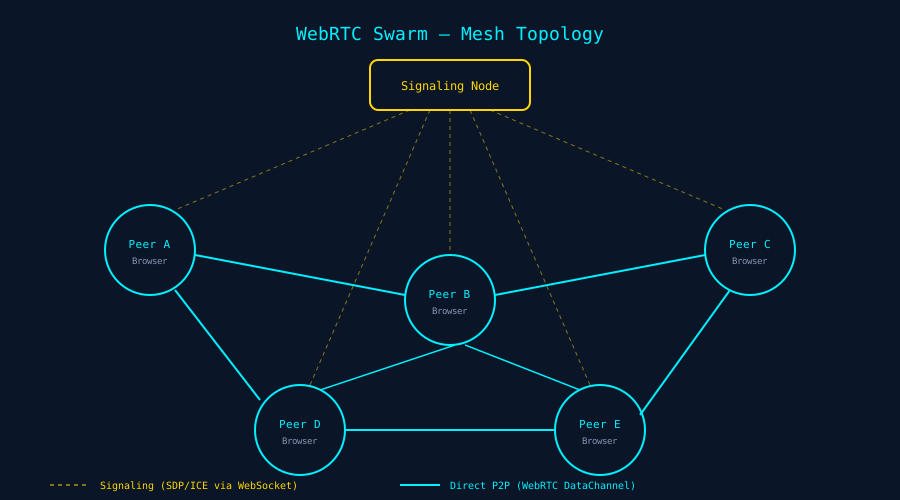
A WebRTC Swarm in GRIDNET OS is a managed mesh network of browser-to-browser connections. Each “swarm” is identified by a unique ID, and all participants who join the same swarm ID are connected to each other in a full-mesh topology — every peer has a direct RTCPeerConnection to every other peer.
The architecture involves three layers:
CSwarmsManager(/lib/SwarmManager.js) — The singleton manager that handles swarm lifecycle, media device management, and signaling routing. Accessed viaCVMContext.getInstance().getSwarmsManager.CSwarm(/lib/swarm.js) — Represents a single swarm instance. Manages the collection of peer connections, event dispatching, authentication, and data broadcasting.CSwarmConnection(/lib/swarmconnection.js) — Represents a single peer-to-peer connection within a swarm. Wraps anRTCPeerConnectionwith data channel management, track management, and authentication.
Swarm Lifecycle
Creating / Joining a Swarm
/**
 * CSwarmsManager.joinSwarm()
 * @param {ArrayBuffer} trueSwarmID  — Human-readable swarm ID (hashed internally)
 * @param {ArrayBuffer} userID       — User identity (empty = session identity)
 * @param {ArrayBuffer} privKey      — Private key for auth (empty = session key)
 * @param {number}      capabilities — eConnCapabilities flags
 * @param {CWindow}     appInstance  — Your dApp window instance
 * @returns {COperationStatus|false}
 */
const mgr = CVMContext.getInstance().getSwarmsManager;
const tools = CTools.getInstance();

const result = mgr.joinSwarm(
  tools.convertToArrayBuffer('my-collab-room'),
  new ArrayBuffer(),
  new ArrayBuffer(),
  eConnCapabilities.data,  // or eConnCapabilities.audioVideo for video calls
  this  // your CWindow instance — auto-cleaned up when window closes
);
How it works internally:
- The true swarm ID is hashed with SHA3-256 and Base58Check-encoded to produce the network swarm ID.
- A new
CSwarminstance is created (or an existing one is reused) and added to the manager. - An SDP “joining” entity (
eSDPEntityType.joining) is constructed, optionally authenticated with a Transmission Token, and sent to the full node viaCNetMsg. - The full node registers the peer and begins brokering connections with other swarm members.
- Your dApp instance is registered as a client process of the swarm — when your window closes, the swarm automatically cleans up.
Leaving a Swarm
mgr.leaveSwarm(tools.convertToArrayBuffer('my-collab-room'));
This sends an SDP “bye” entity to the signaling node, closes all peer connections in the swarm, and releases resources. Swarms also auto-terminate when all client dApp processes have been unregistered (controlled by the killWhenNoProcesses flag, which defaults to true).
Sending Data in a Swarm
const swarm = mgr.findSwarmByID(tools.convertToArrayBuffer('my-collab-room'));

// Broadcast to all peers
swarm.sendData(
  tools.convertToArrayBuffer(JSON.stringify({ type: 'update', data: myPayload })),
  null,   // null target = broadcast
  true    // only to authenticated peers (relevant for private swarms)
);

// Send to a specific peer
swarm.sendData(
  tools.convertToArrayBuffer(myData),
  peerID  // ArrayBuffer — the specific peer's ID
);

// Send a structured swarm message with protocol ID
swarm.sendSwarmMessage(messageData, myProtocolID, true);
Receiving Data
// Level 1: Raw DataChannel messages (lowest level)
swarm.addDataChannelMessageEventListener(function(event) {
  // event contains raw DataChannel message event
}, this.getProcessID);

// Level 2: Parsed messages (CNetMsg encapsulated)
swarm.addMessageEventListener(function(event) {
  // event is parsed and includes connection/peer metadata
}, this.getProcessID);

// Level 3: Swarm-level messages (highest level, includes protocol ID)
swarm.addSwarmMessageEventListener(function(event) {
  // event includes protocolID for application-level routing
}, this.getProcessID);
Audio/Video Capabilities
// Join with audio+video
mgr.joinSwarm(swarmID, userID, privKey, eConnCapabilities.audioVideo, this);

// Manage capabilities dynamically
swarm.setAllowedCapabilities(eConnCapabilities.audioVideo);
swarm.setEffectiveOutgressCapabilities(eConnCapabilities.data); // mute AV

// Listen for incoming tracks
swarm.addTrackEventListener(function(event) {
  // event.streams contains MediaStream objects
  // Attach to <video> or <audio> elements
  const videoEl = document.createElement('video');
  videoEl.srcObject = event.streams[0];
  videoEl.play();
}, this.getProcessID);

// Mute/unmute
await swarm.mute(true, true, true);   // mute audio, video, outgress
await swarm.unmute(true, true);         // unmute audio, video

// Screen sharing
const screenStream = await mgr.startCapture();
if (screenStream) {
  const videoTrack = screenStream.getVideoTracks()[0];
  await swarm.setLIVEVideoTrack(videoTrack, true);  // true = update with peers
}
Connection Quality and Peer Status
// Monitor peer status changes
swarm.addPeerStatusEventListener(function(event) {
  console.log('Peer status changed:', event);
}, this.getProcessID);

// Monitor connection quality
swarm.addConnectionQualityEventListener(function(event) {
  // Quality thresholds (in ms):
  // Max:    < 1000ms
  // High:   < 1500ms
  // Medium: < 2000ms
  // Low:    < 3500ms
  console.log('Connection quality:', event);
}, this.getProcessID);

// Monitor ICE connection state
swarm.addICEConnectionStateChangeEventListener(function(event) {
  console.log('ICE state:', event);
}, this.getProcessID);
Authentication Events
swarm.addPeerAuthResultListener(function(event) {
  // event contains authentication result for a specific peer
  // In private swarms, unauthenticated peers only see dummy tracks
  console.log('Peer authentication result:', event);
}, this.getProcessID);
Part IV: Building a Real Feature — Collaborative Notes dApp
Let’s combine all three capabilities — files, messaging, and swarms — into a single, practical application: a Collaborative Notes dApp where multiple users can edit shared notes in real-time, with changes persisted to the blockchain.
"use strict"
import { CWindow } from "/lib/window.js"

const collabNotesBody = `
<style>
  :host { display: block; height: 100%; }
  .container { display: flex; flex-direction: column; height: 100%;
    background: linear-gradient(135deg, #0a0a14, #0d1a2d);
    font-family: 'Rajdhani', monospace; color: #22fafc; padding: 1em; box-sizing: border-box; }
  .toolbar { display: flex; gap: 8px; margin-bottom: 1em; flex-wrap: wrap; }
  button { background: #1a3a5c; color: #00f0ff; border: 1px solid #00f0ff;
    padding: 6px 14px; cursor: pointer; border-radius: 4px; font-size: 0.85rem; }
  button:hover { background: #00f0ff; color: #0a0a14; }
  button.commit { border-color: #ffd700; color: #ffd700; }
  button.commit:hover { background: #ffd700; color: #0a0a14; }
  textarea { flex: 1; background: #0d1a2d; color: #e0e0e0; border: 1px solid #1a3a5c;
    padding: 1em; font-family: monospace; font-size: 14px; resize: none;
    border-radius: 4px; outline: none; }
  textarea:focus { border-color: #00f0ff; box-shadow: 0 0 10px rgba(0,240,255,0.2); }
  .status-bar { margin-top: 8px; font-size: 0.8rem; color: #8892b0; }
  .peers { color: #00ff88; }
  #roomInput { background: #0d1a2d; color: #00f0ff; border: 1px solid #1a3a5c;
    padding: 6px 10px; border-radius: 4px; width: 200px; }
</style>
<div class="container">
  <div class="toolbar">
    <input id="roomInput" placeholder="Room name..." value="shared-notes" />
    <button id="btnJoin">Join Room</button>
    <button id="btnSave">Save to DFS</button>
    <button id="btnLoad">Load from DFS</button>
    <button id="btnCommit" class="commit">⚡ Commit to Chain</button>
  </div>
  <textarea id="editor" placeholder="Start typing your notes..."></textarea>
  <div class="status-bar">
    Status: <span id="status">Not connected</span>
    | Peers: <span id="peerCount" class="peers">0</span>
  </div>
</div>
`;

class CCollabNotes extends CWindow {

  constructor(x, y, w, h) {
    super(x, y, w, h, collabNotesBody, "Collaborative Notes", CCollabNotes.getIcon(), true);
    this.setThreadID = 'COLLAB_NOTES_' + this.getProcessID;
    this.mVMContext = CVMContext.getInstance();
    this.mFS = this.mVMContext.getFileSystem;
    this.mSwarmManager = this.mVMContext.getSwarmsManager;
    this.mTools = CTools.getInstance();
    this.mSwarm = null;
    this.mTypingDebounce = null;
    this.mFilePath = 'collab-notes.txt';

    // Register DFS listener
    this.mVMContext.addNewDFSMsgListener(
      this.onDFSResponse.bind(this), this.getProcessID
    );

    // Bind UI
    const root = this.shadowRoot;
    root.getElementById('btnJoin').onclick    = () => this.joinRoom();
    root.getElementById('btnSave').onclick    = () => this.saveToFile();
    root.getElementById('btnLoad').onclick    = () => this.loadFromFile();
    root.getElementById('btnCommit').onclick  = () => this.commitToChain();

    // Real-time sync: broadcast changes as user types
    root.getElementById('editor').oninput = () => {
      clearTimeout(this.mTypingDebounce);
      this.mTypingDebounce = setTimeout(() => this.broadcastContent(), 300);
    };

    // Initialize: navigate to a working directory
    this.mFS.doCD('/', true, false, true, this.getThreadID);
    this.mFS.doNewDir('collab', false, this.getThreadID);
    this.mFS.doCD('collab', false, false, true, this.getThreadID);
  }

  static getPackageID() { return "com.demo.collabNotes"; }
  static getIcon() { return '/images/messenger.png'; }
  static getDefaultCategory() { return 'dApps'; }

  setStatus(text) {
    this.shadowRoot.getElementById('status').textContent = text;
  }

  joinRoom() {
    const roomName = this.shadowRoot.getElementById('roomInput').value || 'shared-notes';
    const swarmID = this.mTools.convertToArrayBuffer(roomName);

    // Join with data-only capabilities (no audio/video needed)
    const result = this.mSwarmManager.joinSwarm(
      swarmID, new ArrayBuffer(), new ArrayBuffer(),
      eConnCapabilities.data, this
    );

    if (result) {
      this.setStatus('Joining room: ' + roomName + '...');

      // Find the swarm and register listeners
      setTimeout(() => {
        this.mSwarm = this.mSwarmManager.findSwarmByID(swarmID);
        if (this.mSwarm) {
          this.registerSwarmListeners();
          this.setStatus('Connected to: ' + roomName);
        }
      }, 1000);
    }
  }

  registerSwarmListeners() {
    // Listen for incoming data from peers
    this.mSwarm.addDataChannelMessageEventListener((event) => {
      try {
        const msg = JSON.parse(this.mTools.arrayBufferToString(event.data));
        if (msg.type === 'content-update') {
          // Update editor with peer's content
          const editor = this.shadowRoot.getElementById('editor');
          const cursorPos = editor.selectionStart;
          editor.value = msg.content;
          // Restore cursor position (basic conflict resolution)
          editor.selectionStart = editor.selectionEnd = Math.min(cursorPos, msg.content.length);
        }
      } catch (e) { /* ignore non-JSON messages */ }
    }, this.getProcessID);

    // Track peer count
    this.mSwarm.addPeerStatusEventListener((event) => {
      const count = this.mSwarm.peers ? this.mSwarm.peers.length : 0;
      this.shadowRoot.getElementById('peerCount').textContent = count;
    }, this.getProcessID);

    this.mSwarm.addSwarmConnectionStateChangeEventListener((event) => {
      const count = this.mSwarm.peers ? this.mSwarm.peers.length : 0;
      this.shadowRoot.getElementById('peerCount').textContent = count;
    }, this.getProcessID);
  }

  broadcastContent() {
    if (!this.mSwarm) return;
    const content = this.shadowRoot.getElementById('editor').value;
    const msg = JSON.stringify({ type: 'content-update', content: content });
    this.mSwarm.sendData(
      this.mTools.convertToArrayBuffer(msg), null, false
    );
  }

  saveToFile() {
    const content = this.shadowRoot.getElementById('editor').value;
    const result = this.mFS.updateFile(this.mFilePath, content, false, this.getThreadID);
    this.setStatus('Saved to DFS (uncommitted)');
  }

  loadFromFile() {
    const result = this.mFS.doGetFile(this.mFilePath, false, this.getThreadID);
    this.addNetworkRequestID(result.getReqID);
    this.setStatus('Loading from DFS...');
  }

  commitToChain() {
    // First save current content, then commit
    this.saveToFile();
    const result = this.mFS.doCommit(false, 'system');
    this.setStatus('Committing to blockchain...');

    // Listen for commit state changes
    this.mVMContext.addVMCommitStateChangedListener((state) => {
      switch (state) {
        case eCommitState.pending:
          this.setStatus('Commit pending — awaiting consensus...');
          break;
        case eCommitState.success:
          this.setStatus('✓ Committed to blockchain!');
          break;
        case eCommitState.aborted:
          this.setStatus('✗ Commit aborted');
          break;
      }
    }, this.getProcessID);
  }

  onDFSResponse(msg) {
    // Handle file read responses
    if (msg.getData && msg.getData.byteLength > 0) {
      try {
        const content = this.mTools.arrayBufferToString(msg.getData);
        this.shadowRoot.getElementById('editor').value = content;
        this.setStatus('Loaded from DFS');
      } catch (e) {}
    }
  }

  // Cleanup when window closes
  closeWindow() {
    if (this.mSwarm) {
      this.mSwarm.removeClientAppInstance(this);
    }
    super.closeWindow();
  }
}

export { CCollabNotes };
This dApp demonstrates the three pillars working together:
- File System: Notes are saved to
/collab/collab-notes.txton the decentralized file system and committed to the blockchain. - WebRTC Swarm: When users join the same room name, they connect via a WebRTC swarm and receive real-time content updates from peers.
- Blockchain Persistence: The “Commit to Chain” button permanently stores the current note content on the blockchain — a timestamped, immutable snapshot.
Part V: Error Handling and Edge Cases
Connection Drops
GRIDNET OS handles disconnections at multiple levels:
- WebSocket disconnection: The
CVMContextconnection controller automatically attempts reconnection. The commit lock is broken on disconnect, and all swarms are dissociated. Listen foreConnectionState.disconnectedviaaddConnectionStatusChangedListener(). - WebRTC peer disconnection: Individual
CSwarmConnectioninstances detect ICE disconnections and clean up. The swarm remains active and will re-establish connections when the peer returns. - Commit during disconnect: If a commit is in progress when the connection drops, the commit state transitions to
eCommitState.abortedand the commit lock is forcefully broken.
// Listen for connection state changes
CVMContext.getInstance().addConnectionStatusChangedListener(
  function(state) {
    switch (state) {
      case eConnectionState.connected:
        console.log('Connected to full node');
        // Re-sync file system state
        CVMContext.getInstance().getFileSystem.doSync();
        break;
      case eConnectionState.disconnected:
        console.log('Disconnected — will auto-reconnect');
        break;
      case eConnectionState.connecting:
        console.log('Reconnecting...');
        break;
    }
  },
  this.getProcessID
);
Commit Conflicts
The commit lock mechanism (tryLockCommit(), breakCommitLock()) prevents multiple dApps from committing simultaneously. If your dApp needs to commit but the lock is held by another dApp:
- Pass
breakCommit = trueto force-break the existing lock (use sparingly). - Or listen for
eCommitState.none/eCommitState.successto wait for the current commit to complete.
Thread Safety
GRIDNET OS operations targeting the system thread are blocked during pending commits (the processVMMetaDataKF method checks the commit lock). Operations on the data thread or sub-threads are not blocked — they are treated as read-only or non-conflicting.
Missing Directories
Always use dontThrow = true when navigating to directories that might not exist:
// Safe navigation — won't crash the VM if directory doesn't exist
fs.doCD('possibly-missing-dir', true, false, true, this.getThreadID);
Part VI: Performance Patterns
Atomic CD+LS
Always use doCD(path, true) instead of separate doCD() + doLS() calls. The combined operation saves a full network round trip — the full node executes both atomically.
Debounced Saves
For real-time editors, debounce file updates to avoid flooding the network:
let saveTimeout = null;
editor.oninput = () => {
  clearTimeout(saveTimeout);
  saveTimeout = setTimeout(() => {
    fs.updateFile('notes.txt', editor.value, false, threadID);
  }, 500); // Save at most every 500ms
};
Request ID Tracking
Use addNetworkRequestID() to track which async responses belong to your dApp. This is especially important when multiple dApps are running simultaneously — each may receive DFS responses meant for other dApps.
Swarm Data Serialization
When sending data through swarms, always serialize to ArrayBuffer via CTools.getInstance().convertToArrayBuffer(). JSON serialization works well for structured messages:
// Efficient swarm message pattern
const payload = JSON.stringify({ type: 'cursor', pos: 42, user: 'Alice' });
swarm.sendData(tools.convertToArrayBuffer(payload), null, false);
Cleanup on Close
Always override closeWindow() to clean up listeners and swarm registrations:
closeWindow() {
  // Unregister from swarms
  if (this.mSwarmManager) {
    this.mSwarmManager.unregisterProcessFromSwarms(this.getProcessID);
  }
  // Unregister event listeners by appID
  if (this.mSwarmManager) {
    this.mSwarmManager.unregisterEventListenersByAppID(this.getProcessID);
  }
  // Call parent cleanup
  super.closeWindow();
}
Lazy Sync
Don’t call doSync() on every operation. Sync pulls the entire committed state from the blockchain — it’s expensive. Use it:
- On dApp startup (to get the latest state).
- After reconnection (to catch up on changes made while disconnected).
- Periodically in long-running dApps (every 30-60 seconds at most).
Quick Reference Card
| Operation | Method | Default Thread |
|---|---|---|
| Change directory | fs.doCD(path, doLS, breakCommit, dontThrow, threadID) |
data |
| List directory | fs.doLS(threadID, breakCommit) |
data |
| Create file | fs.doNewFile(path, content, breakCommit, threadID) |
data |
| Update file | fs.updateFile(path, content, breakCommit, threadID) |
data |
| Read file | fs.doGetFile(path, breakCommit, threadID) |
data |
| Create directory | fs.doNewDir(path, breakCommit, threadID) |
data |
| Commit to chain | fs.doCommit(breakCommit, threadID) |
system |
| Sync from chain | fs.doSync(breakCommit, threadID) |
system |
| Join swarm | mgr.joinSwarm(swarmID, userID, privKey, caps, appInstance) |
— |
| Leave swarm | mgr.leaveSwarm(trueSwarmID) |
— |
| Send swarm data | swarm.sendData(data, target, onlyAuthenticated) |
— |
What Comes Next
You now have the tools to build real, decentralized applications. Files that persist on a blockchain. Messages that travel directly between browsers. Swarms that connect peers in real-time mesh networks. No servers. No cloud. No middlemen.
In the next article in this series, we will explore GridScript in depth — the native scripting language of GRIDNET OS. You will learn how to write smart contracts, define custom transaction logic, and extend the blockchain’s behavior programmatically. GridScript is where the decentralized state machine truly becomes programmable.
But first: take the Collaborative Notes dApp above, deploy it, and use it. Break it. Extend it. Add user cursors. Add version history. Add file sharing between accounts. The platform is there. Now build.