
Preface — The Language That Became an Operating System
In 1970, Charles H. Moore created Forth — a programming language so minimal, so close to the metal, that it could run on hardware with 8 kilobytes of memory. Forth was not elegant in the way that Lisp was elegant, nor structured in the way Pascal was structured. It was something else entirely: a language where the programmer thought in terms of a stack, where every operation consumed values and produced values, where the boundary between the language and the machine dissolved into nothing. NASA used Forth to control spacecraft. Telescope operators used it to point instruments at distant galaxies. It was the language of people who needed absolute control over every byte.
Half a century later, a different kind of machine needed a language with those same properties — not a spacecraft, but a decentralized state machine. A machine that does not exist in any single location, that is maintained by independent operators across the globe, that must execute every instruction identically on every node, and that must do so with mathematical certainty. This machine is GRIDNET OS — the world’s first decentralized operating system. And its language is GridScript.
GridScript is derived from Forth, but it is not Forth. Where Forth was designed to control hardware, GridScript was designed to control consensus. Where Forth communicated with serial ports and memory-mapped I/O, GridScript communicates with a Merkle Patricia Trie holding the global state of a decentralized network. Where Forth programs ran on a single processor, GridScript programs are replicated and executed across every node in the network — deterministically, verifiably, and irreversibly. And where Forth execution is essentially free — instructions run as fast as the processor allows with no accounting — every single GridScript instruction consumes ERG (Execution Resource Gas), making it a metered computation model where unbounded execution is impossible by design. This single difference transforms GridScript from a language into an economic mechanism: computation has a price, and that price prevents denial-of-service attacks against the network.
GridScript serves simultaneously as:
- The transaction language — every blockchain transaction is a GridScript program compiled to bytecode
- The smart contract language — decentralized applications are written, deployed, and invoked in GridScript
- The system shell — operators manage GRIDNET Core nodes through an interactive GridScript terminal
- The consensus language — all nodes execute the same GridScript deterministically to reach agreement on state
- The query language — all data retrieval from the decentralized state machine is performed through GridScript execution
This article is a comprehensive guide to GridScript — its architecture, its execution model, its role as the backbone of a decentralized service-oriented architecture, and its practical use in building applications that run without servers, without central authorities, and without trust in any single entity.
I. Decentralized Processing Threads — The Cornerstone of Everything
If you understand only one concept in GridScript, let it be this: Decentralized Processing Threads (DPTs). They are the mechanism through which every interaction with GRIDNET OS occurs — every value transfer, every smart contract call, every data query, every file operation. DPTs are to GRIDNET OS what HTTP requests are to the web, except they execute Turing-complete code inside a metered virtual machine on a decentralized network.
BT and CT — Begin Thread, Commit Thread
The two most important commands in GridScript are BT (Begin Thread) and CT (Commit Thread). Together, they define the lifecycle of a transaction:
BT
cd /YourDomainAddress
send RecipientAddress 1000000000000000000
CT
When BT executes, it creates a new sub-thread — a sandbox where subsequent GridScript commands are accumulated but not executed. The commands are recorded into a code buffer. Inline commands like send are automatically converted to their explicit stack-based forms (sendEx) for serialization. The thread tracks its own ERG (Execution Resource Gas) consumption.
When CT executes, it collects code from all ready threads, compiles the accumulated GridScript into bytecode, signs the transaction with the user’s private key, and submits it to the network. The transaction then propagates to all nodes, where it is re-executed in kernel mode — deterministically, identically, on every machine — and the resulting state changes are committed to the global Merkle Patricia Trie.
Ephemeral vs. Committed — The Two Modes of DPTs
Not all DPTs result in blockchain transactions. This distinction is fundamental:
Committed DPTs follow the full BT → accumulate → CT cycle. They produce signed transactions that modify the global state. A value transfer, a smart contract deployment, an identity registration — these are committed DPTs.
Ephemeral DPTs execute GridScript on a remote GRIDNET Core node without committing anything to the blockchain. They are read-only queries against the current state of the decentralized state machine. When the Blockchain Explorer displays a list of recent transactions, it is using ephemeral DPTs. When the Wallet dApp retrieves an account balance, it is using an ephemeral DPT. The GridScript executes, reads from the state trie, produces a BER-encoded result, and the thread is discarded. No transaction is signed. No bytecode is stored. No ERG is charged to the user’s account.
This dual nature — the same mechanism serving both state-modifying transactions and read-only queries — is what makes DPTs the cornerstone of the entire GRIDNET OS architecture. Every UI dApp, every data retrieval operation, every interaction that a user has with the decentralized state machine flows through a DPT.
Multi-Thread Transactions
GridScript supports formulating up to five threads simultaneously (MAX_THREADS_COUNT = 5), enabling atomic multi-operation transactions:
BT
cd /DomainA
send Recipient1 1000000000000000000
BT
cd /DomainB
send Recipient2 2000000000000000000
CT      \ Commits all ready threads as one atomic transaction
Thread management commands provide fine-grained control: RT (Resume Thread), ST (Suspend Thread), PT (Print Thread — show accumulated code), FT (Focus Thread — switch between threads), and AT (Abort Thread — discard accumulated code).
II. GridScript as a Decentralized Service-Oriented Architecture
Stop and consider what is actually happening when a user opens the Wallet UI dApp or the Blockchain Explorer in their browser. Every balance displayed. Every transaction listed. Every block detail rendered. Every identity resolved. None of it comes from a traditional server. There is no PHP backend. There is no .NET API. There is no REST endpoint hosted in a data center. Every single piece of data the user sees on screen is retrieved through GridScript code executing on remote GRIDNET Core nodes — decentralized machines operated independently across the network.
This is the GridScript Service-Oriented Architecture (SOA), and it is what makes the entire GRIDNET OS dApp ecosystem work.
The Data Flow Pipeline
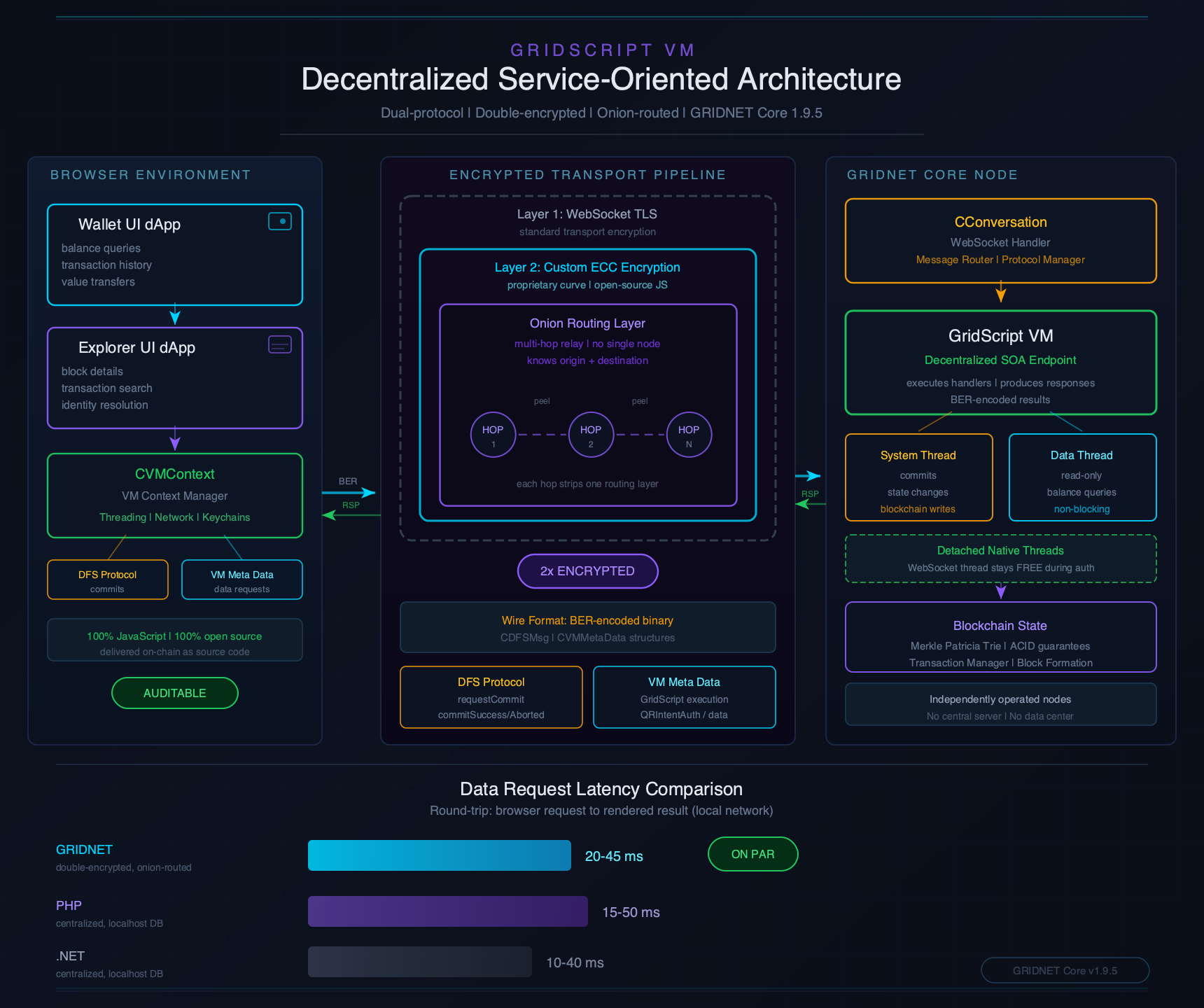
The SOA pipeline operates in six stages:
- JavaScript formulates the request — Browser-side code in
VMContext.js(which exports theCVMContextsingleton) constructs a GridScript data request. This might be a balance query, a transaction search, a block listing, or a domain lookup. - BER encoding — The request is serialized using BER (Basic Encoding Rules) — an efficient binary encoding format derived from ASN.1. BER is not JSON. It is not Protocol Buffers. It is a compact, self-describing binary format that can represent complex nested data structures with minimal overhead. Web Workers perform the encoding off the main thread to keep the UI responsive.
- Double-encrypted transport — The BER-encoded request is wrapped in ECC (Elliptic Curve Cryptography) encryption at the application level, then transmitted through a TLS-secured WebSocket. Two independent encryption layers. An attacker who compromised TLS would still face a second cryptographic barrier.
- GridScript VM execution — The remote GRIDNET Core node receives the request, decodes it, and executes the corresponding GridScript handler. The VM traverses the Merkle Patricia Trie — the global state database — reading account data, transaction histories, block headers, identity tokens, or whatever the request demands.
- BER-encoded response — The results are packaged into structured BER metadata — organized into typed sections (
directoryListing,searchResults,notifications,transactionInfo,blockInfo,domainInfo) containing typed entries. This structured format enables rich data exchange between the VM and the browser. - CVMContext receives and dispatches — The BER-encoded response arrives back through the same double-encrypted, onion-routed channel. The in-browser GRIDNET OS subsystem — the CVMContext singleton — receives the raw data, decodes it using
CVMMetaParser, and dispatches it through two distinct mechanisms:- Active waiting (request-response) — A UI dApp that initiated a specific data request is actively awaiting the response. It holds a pending Promise or async callback keyed to the request ID it generated. When
CVMContextencounters that request ID in the incoming BER data, it resolves the waiting call directly — the dApp receives exactly the data it asked for. This is the primary pattern for queries: the Wallet asks for a balance, the Explorer asks for a block list, and eachawaits the specific response. - Passive notification (event-driven) — UI dApps may also register general-purpose event listeners for broad categories of data — new block announcements, VM state changes, commit status transitions, DFS updates, incoming network messages. These listeners fire whenever
CVMContextreceives matching data, regardless of whether the dApp initiated the request. A new block notification may reach both the Explorer and the Wallet simultaneously; a commit confirmation may notify multiple dApps that share a transaction context. The dApp does not ask for this data — it arrives because the dApp has expressed interest in a category of events.
This dual dispatch model — active request-response correlation and passive event subscription — operating simultaneously through the same
CVMContextsingleton is what gives GRIDNET OS UI dApps both the responsiveness of traditional client-server applications and the real-time reactivity of event-driven systems. - Active waiting (request-response) — A UI dApp that initiated a specific data request is actively awaiting the response. It holds a pending Promise or async callback keyed to the request ID it generated. When
- UI dApp renders — Whether actively awaiting a response or passively notified of an event, the UI dApp instance receives the decoded data, processes it according to its own logic, and updates its Shadow DOM. The user sees data on screen and has no idea that what just happened bears no resemblance to a conventional HTTP request-response cycle.
Performance That Defies Expectations
The measured balance update latency — the round-trip time from browser request to rendered result through this entire double-encrypted, BER-encoded pipeline — is 20–45 milliseconds on a local network (WAN latency varies with node proximity and network hops). This is on par with, and in many cases faster than, conventional centralized web frameworks querying a local database.
This performance is possible because BER encoding is remarkably efficient for the structured data GRIDNET OS works with. Unlike JSON, which carries field names as human-readable strings in every message, BER uses numeric tags and length prefixes, producing payloads that are significantly smaller. Unlike Protocol Buffers, BER requires no schema compilation step — the encoding is self-describing. The VM Meta-Data Protocol builds on BER with a Sections → Entries structure, where each section has a typed purpose and each entry carries a request ID for correlation — enabling multiple concurrent asynchronous requests to be in flight simultaneously.
How dApps Use This Architecture
The Blockchain Explorer UI dApp provides a vivid example. When a user navigates to the Blocks view, the Explorer’s JavaScript constructs a GridScript request to fetch recent blocks with sorting and filtering parameters. The request is BER-encoded, dispatched through the encrypted WebSocket, and routed to a GRIDNET Core node. On that node, the GridScript VM executes a stateful iterator — a cursor that traverses the block chain with pagination support, filter matching, and sort optimization. The VM enhanced this capability with stateful iterators that remember position between calls, eliminating the need to re-traverse from the beginning for each page of results. The results — block headers with height, timestamp, transaction count, miner ID, difficulty, reward — are BER-encoded into a searchResults section and returned. The browser decodes and renders a Tabulator data grid with cyberpunk aesthetics.
The BER Meta-Data Protocol
Communication between browser and GRIDNET Core follows a structured protocol built on BER encoding:
// JavaScript side — constructing a request
const generator = new CVMMetaGenerator();
generator.addRAWGridScriptCmd(gridScriptCode, requestID, processID, vmID);
const berData = generator.finalize();
// Send through encrypted WebSocket...
Architecture reference (GRIDNET Core internal):
// On the GRIDNET Core side — C++ processing
CVMMetaGenerator gen;
gen.beginSection(eVMMetaSectionType::searchResults);
gen.addTransactionInfo(txDesc, reqID, appID, vmID);
gen.endSection();
gen.finalize();
vector<uint8_t> data = gen.getData();
The protocol supports dozens of entry types: GridScriptCode, terminalData, transactionInfo, blockInfo, domainInfo, searchResults, fileContent, stateLessChannelElement, and many more. Each entry carries metadata for request-response correlation, enabling the browser to match responses to the specific UI component that initiated the request.
The three-tier data hierarchy — Level 1 (raw transaction/receipt on-chain data), Level 2 (core info containers), Level 3 (BER-compatible description objects for transactions, blocks, and domains) — ensures that the same data structures are serialized identically in C++ and JavaScript, achieving full parity between the native Core implementation and the browser-side ECMA6 objects.
III. Where GridScript Runs — The Six Execution Contexts
GridScript is not confined to a single execution environment. It runs in six distinct contexts, each with different capabilities and security restrictions:
1. SSH — Direct Connection to GRIDNET Core
The most direct way to interact with GridScript. Connect via SSH to a running GRIDNET Core node and you have a full interactive terminal — the Forth heritage made tangible. Type commands, watch the stack, formulate transactions, manage the node. Every command in the GridScript vocabulary is available, subject only to authentication level.
\ SSH session example
10 20 + .          \ prints 30
." Hello, GRIDNET!" cr
balance 'MyDomain'
.                  \ prints balance in attoGNC
2. Local Instance — Ctrl+E in GRIDNET Core
When running GRIDNET Core directly, pressing Ctrl+E switches from the Events View to the Terminal View — an embedded GridScript console. This provides the same capabilities as SSH but with physical access to the machine. Certain administrative commands (like shutdown or firewall) may require this local context.
3. Terminal UI dApp — Browser-Based Terminal
The Terminal dApp brings GridScript to the browser. Built on xterm.js, it provides a full terminal experience within the GRIDNET OS desktop environment. The Terminal registers for VM metadata callbacks, DFS message events, and GridScript result notifications through CVMContext — the same SOA pipeline used by all dApps. Commands entered in the browser terminal are transmitted to a GRIDNET Core node for execution, with results streamed back in real-time.
4. Smart Contract Execution — On-Chain Bytecode
When a transaction is committed, its GridScript is compiled to bytecode and executed in kernel mode across all network nodes. Kernel mode is the consensus context — fully deterministic, no terminal I/O, no file system access, no user interaction. The VM checks REG_KERNEL_THREAD to enforce these restrictions. Smart contracts deployed via BC/EC (Begin Code / End Code) are stored as bytecode in the state trie:
BT
cd /YourDomain/contracts
BC
cd /YourDomain
getVar 'counter'
1 +
0 "counter" setVarEx
EC
CT
The bytecode format uses sequential opcode assignment starting from BASE_OPCODE_ID = 9. Single-byte encoding for opcodes ≤ 127, two-byte encoding for higher values. The order of codewords is immutable — new commands are always appended at the end. Reordering would break every compiled contract on the blockchain.
5. Implicit via JavaScript APIs — VMContext.js
This is the SOA context described in the previous section. JavaScript code in the browser generates GridScript automatically — the developer may not even realize GridScript is being executed. When a dApp calls a balance query or transaction search through CVMContext, the JavaScript constructs GridScript data requests, BER-encodes them, and dispatches them to remote nodes.
6. User Interactions with UI dApps
Drag a file in the File Manager. Send GNC in the Wallet. Deploy an identity token. Every user action in a UI dApp is ultimately formulated as GridScript — making it reproducible across the entire decentralized system once committed. The Wallet dApp pioneered this architecture: JavaScript ECMA6 formulates GridScript instruction sequences, Web Workers perform BER encoding and GridScript compilation and ECC signing off the main thread, and compiled bytecode is dispatched through onion-routed encrypted WebSocket channels.
The Security Model — Permission Layers in Depth
Every one of GridScript’s 312+ codewords carries 18 security properties that are checked at runtime before the instruction executes. This is not a coarse-grained permission system — it is per-instruction, per-context security enforcement.
Permission Levels
From least restrictive to most restrictive:
Level 1: Public Commands — Arithmetic (+, -, *, /), stack operations (dup, drop, swap), comparison, and logic. These execute in any context — kernel mode, terminal, GUI, smart contract. No restrictions.
Level 2: Terminal-Only Commands (onlyFromTerminal = true) — BT, CT, keygen, BC/EC, setKey, node configuration. These cannot be called from kernel mode during consensus execution. If a smart contract attempted to call BT, the VM would reject it — you cannot formulate a transaction from within a transaction.
Level 3: Local Admin Commands (requiresLocalAdminCredentials = true) — shutdown, firewall. These require physical or local access to the machine and administrator authentication via sudo.
Level 4: Overwatch Commands (allowedOnlyByAnOverwatch = true) — Critical system modifications that only the network’s highest-privilege entities (overwatches) can perform. The VM checks REG_EXECUTING_BY_OVERWATCH (register 16).
Level 5: Kernel-Restricted Commands (allowedInKernelMode = false) — File I/O, erg management, network operations, blockchain queries like getChain, stepBack. These are forbidden during consensus execution because they would break determinism.
Security Registers — Identity and Privilege
GridScript maintains 54 special-purpose registers (indices 0—53). Several are critical for security:
REG_CALLERS_ID (register 11) vs REG_AUTHENTICATED_SD (register 12) — REG_CALLERS_ID identifies who signed and paid for the transaction. REG_AUTHENTICATED_SD identifies who has permission to execute the current operation. These can differ during delegation, proxy execution, or sponsored transactions.
\ Inside a smart contract — check both:
11 getReg     \ Read REG_CALLERS_ID — who SIGNED the transaction
12 getReg     \ Read REG_AUTHENTICATED_SD — who HAS PERMISSION
fcomp         \ Compare them
\ If different: delegation or proxy execution is occurring
⚠ REG_AUTHENTICATED_SD must be cleared after a dApp exits — failure to do so causes privilege leakage.
REG_KERNEL_THREAD (register 34) — The kernel mode flag. When set, execution is occurring as part of consensus. Only kernel threads can modify decentralized state. This register is read-only and set internally by the VM.
Complete Register Reference — All 54 Registers (0—53)
GridScript maintains 54 special-purpose registers accessible via the getReg codeword. Each register stores state critical to the operation of the Decentralized State Machine.
| # | Name | Description | Category |
|---|---|---|---|
| 0 | REG_EXEC_SD |
Executing State Domain – current domain context affecting data access scope | Critical |
| 1 | REG_DATA_TYPE |
Data Type Indicator for the most recent operation result | Context |
| 2 | REG_SIGN |
Sign flag from the most recent arithmetic operation | Context |
| 3 | REG_CURRENT_SD |
Current state domain – active domain for state operations (set by cd) |
Context |
| 4 | REG_CURRENT_DIR |
Current directory path within the state domain (DFS navigation) | Context |
| 5 | REG_THROW_ON_FAILURE |
When set, operations throw runtime errors on failure instead of returning error codes | Error |
| 6 | REG_PRIV_KEY |
Active private key for signing operations (terminal session) | Crypto |
| 7 | REG_RECEIPT_ID |
Receipt ID of the current transaction (set after commit) | Crypto |
| 8 | REG_BASE58_DEBUG_VIEW |
When set, .s and .m display pointer values in base58 encoding |
Debug |
| 9 | REG_MAKING_SACRIFICE |
Flag: a sacrifice (staking) operation is in progress | State |
| 10 | REG_EXECUTING_CODE_ID |
Identifier of the currently executing code bundle (smart contract path) | System |
| 11 | REG_CALLERS_ID |
Critical: Identity of the entity that signed and paid for the transaction. | Critical |
| 12 | REG_AUTHENTICATED_SD |
Critical: Identity of the entity with permission to execute the current operation. | Critical |
| 13 | REG_DAPP_INC_BALANCE_CHANGE |
Incremental balance change caused by the current dApp execution | State |
| 14 | REG_DOING_COLON |
Flag: currently inside a colon definition (: name ... ;) |
Exec State |
| 15 | REG_SACRIFICED_VALUE |
The GNC amount sacrificed (staked) in the current transaction | State |
| 16 | REG_EXECUTING_BY_OVERWATCH |
Security: When set, grants highest privilege level (Overwatch restricted). | Critical |
| 17 | REG_TALKING_TO |
Target entity for messaging operations | System |
| 18 | REG_APP_RUNNING |
Flag: a dApp (smart contract) is currently executing | System |
| 19 | REG_EXTERNAL_DATA |
External data attached to the current execution context | System |
| 20 | REG_REQ_APP_ABORT |
Request abort of the currently running dApp from external source | System |
| 21 | REG_SUPPRESS_THROW |
Suppresses throw on the very next instruction. Auto-clears after one instruction. | Error |
| 22 | REG_SUPPRESS_DFS_THROW |
Suppresses throw on the next DFS operation. Auto-clears after next DFS call. | Error |
| 23 | REG_COMMIT_PENDING |
Flag: a transaction commit is pending network confirmation | Control |
| 24 | REG_THREAD_READY |
Flag: thread/transaction formulation is finished and ready for commitment | Control |
| 25 | REG_THREAD_PAUSED |
Flag: the current thread is paused (via ST) |
Control |
| 26 | REG_EXECUTING_INSTRUCTION |
Currently executing instruction identifier | Exec State |
| 27 | REG_EXECUTING_PROGRAM |
Currently executing program/word identifier | Exec State |
| 28 | REG_HIGH_PRECISION |
Enables high-precision arithmetic mode and display formatting. | Output |
| 29 | REG_LOGGED_IN_AS |
Identity of the currently logged-in user (set by logmein) |
Critical |
| 30 | REG_WAS_SANDBOX_PRE_AUTHED |
Per-command sandbox pre-authorization flag | Security |
| 31 | REG_IS_THREAD_UI_AWARE |
Security: Indicates if thread can perform UI operations (Read-Only). | Critical |
| 32 | REG_IS_TEXT_OUTPUT_ENABLED |
Controls whether text output operations produce visible output | Threading |
| 33 | REG_HAS_DETACHED_THREAD |
Indicates whether a detached native thread is attached to VM thread | Threading |
| 34 | REG_KERNEL_THREAD |
Critical: Kernel mode flag (Read-Only). Execution is part of consensus. | Critical |
| 35 | REG_DO_NOT_COMPILE_READS |
When set, data-read operations are excluded from bytecode compilation | Compilation |
| 36 | REG_NEW_LINE |
Internal newline tracking for output formatting | Threading |
| 37 | REG_PP_MODE |
Flag: executing within a GridScript++ (evalGPP) context |
Exec State |
| 38 | REG_ABORT |
Abort signal from GridScript++ context | Control |
| 39 | REG_LAST_ERROR |
Contains the error message from the most recent failure | Error |
| 40 | REG_CURRENT_CODE_PATH |
File path of the currently executing code | Context |
| 41 | REG_ASSETS_RECEIVED_FROM |
Identity of the entity that sent assets (GNC) to the current context | State |
| 42 | REG_PRESERVE_RECENT_CALL |
Instructions leading to current dApp invocation remain in compiled source | Compilation |
| 43 | REG_IMPLICIT_CALL_THREAD_BEGAN |
Internal: implicit contract call has been initiated | Control |
| 44 | REG_CALLERS_ID_BEFORE_DAPP_CALLED |
Saved identity before dApp invocation. Restored on exit. | Security |
| 45 | REG_EXCUSE_ERG_USAGE |
Bypasses ERG checks during block replay (Trusted Internal Only). | ERG |
| 46 | REG_KERNEL_ERG_BID |
ERG bid (price per ERG unit). Set via erg -setbid. |
ERG |
| 47 | REG_KERNEL_ERG_LIMIT |
Max ERG allowed for transaction. Set via erg -setlimit. |
ERG |
| 48 | REG_KERNEL_NONCE |
Manual nonce override. Allows enqueueing transactions. | Threading |
| 49 | (Reserved) | Internal structural reserve | – |
| 50 | REG_CUMULATIVE_TRANSFER_GNC |
Running total of GNC transferred in current transaction bundle. | State |
| 51 | REG_CUMULATIVE_TT_CASHOUT_GNC |
Running total of TT cashout value in this transaction. | State |
| 52 | REG_ALL_GNC_RECIPIENTS |
Array of recipient-value pairs for current transaction. | State |
| 53 | REG_ALL_TT_POOL_IDS |
Set of unique Token Pool IDs involved in current transaction. | State |
Contract Debugging with REG_PRESERVE_RECENT_CALL
Debugging decentralized code is notoriously difficult. GridScript addresses this via Register 42 (REG_PRESERVE_RECENT_CALL). When this register is enabled (set to 1), the VM includes the instructions that preceded the call or callEx codeword in the final compiled bytecode. This allows for full stack-trace reconstruction in the event of a contract failure, as the parameters passed to the contract remain part of the signed transaction record rather than being discarded after execution. This is a critical tool for developers during the “Magic Button” (⟪⟪⟪) debugging phase, ensuring that opaque contract errors can be traced back to their specific input state.
IV. Stack-Based Fundamentals — The Forth Heritage
If you have never used a stack-based language, the mental model is simple:
- Everything is a word — commands, numbers, operators are all “words”
- Numbers push themselves onto the stack
- Words consume and produce stack values
- No parentheses needed — execution order is left-to-right, stack-driven
10 20 +     \ Push 10, push 20, add → stack contains 30
5 *         \ Push 5, multiply → stack contains 150
.           \ Print top of stack → outputs "150"
The Three Stacks
GridScript maintains three stacks:
Data Stack (dStack) — The primary operand stack. Maximum depth: 256. This is where you push numbers, pointers, addresses, and where operations consume and produce results.
Return Stack (rStack) — Used for temporary storage and loop control. Loop constructs (DO...LOOP) use the return stack to track loop indices.
Meta Stack — Parallel to the data stack, tracking type information (integer, pointer, string, BigInt) for runtime type checking and debugging. Each value on the data stack has a corresponding type descriptor on the meta stack.
Stack Manipulation
dup         \ ( a -- a a )        Duplicate top
swap        \ ( a b -- b a )      Swap top two
over        \ ( a b -- a b a )    Copy second to top
rot         \ ( a b c -- b c a )  Rotate top three
drop        \ ( a -- )            Remove top
pick        \ ( ... u -- ... xu ) Copy item at depth u
roll        \ ( ... u -- ... )    Move item at depth u to top
depth       \ ( -- n )            Current stack depth
Control Flow — Conditionals, Loops, and Word Definitions
GridScript inherits Forth’s complete control flow vocabulary. All branching constructs compile to (zbranch) and (branch) opcodes at compile time.
Conditionals — IF…THEN…ELSE
\ IF...THEN (basic conditional)
: is-positive ( n -- )
    0 > IF
        ." Positive!" cr
    THEN
;
5 is-positive        \ prints: Positive!

\ IF...ELSE...THEN
: abs ( n -- |n| )
    dup 0 < IF
        -1 *
    ELSE
        \ already positive, do nothing
    THEN
;
-7 abs .             \ prints: 7
Counted Loops — DO...LOOP and DO...+LOOP
\ DO...LOOP — iterates from start to limit-1
: count-to ( n -- )
    0 DO
        i .          \ 'i' pushes current loop index
    LOOP cr
;
5 count-to           \ prints: 0 1 2 3 4
Indefinite Loops — BEGIN...UNTIL and BEGIN...WHILE...REPEAT
\ BEGIN...UNTIL (post-test — always executes at least once)
: countdown ( n -- )
    BEGIN
        dup . 1 -
        dup 0 =
    UNTIL drop cr
;
V. Command Reference — The GridScript Vocabulary
GridScript’s vocabulary encompasses 312 codewords. Each entry shows the command name, its stack effect notation ( before -- after ), and its purpose.
Data Input
data64( -- ptr )— Push base64Check-decoded binary data onto the stackdata( -- ptr )— Push UTF-8 string data onto the stackdata58( -- ptr )— Push base58Check-decoded binary data (e.g. addresses)
Assertions
assert( flag -- )— Abort execution if flag is false (0)assert0( flag -- )— Abort execution if flag is true (nonzero)anz( n -- n )— Assert non-zero: aborts execution ifnis zero
Memory Access
!( value addr -- )— Store cell value at address@( addr -- value )— Fetch cell value from addressalloc( size -- addr ior )— Allocate memory block (1 ERG per byte)free( addr -- )— Free previously allocated memory
Arithmetic & Logic
+,-,*,/,mod— Standard arithmetic operations<,=,>— Basic comparison (returns 1 for true, 0 for false)and,or,xor— Bitwise logicfcomp( ptr1 ptr2 -- flag )— Compare two binary pointers
State & Persistence
cd( -- )— Change directory / State Domain (inline param:/path)getVar( -- ptr )— Read variable state (inline param:name)setVarEx( value isHidden name -- )— Write persistent state variablels( -- )— List directory/domain contentswrite( -- )— Write data to DFS file (inline param:filename)cat( -- ptr )— Read data from DFS file (inline param:filename)
Value Transfer (GNC)
send( -- )— Send GNC (inline params:address amount)sendEx( flags target amount -- )— Explicit value transferbalance( -- ptr )— Query GNC balance (inline param:address)xvalue( -- value )— Get GNC amount attached to transactiongotGNC( -- flag )— Returns 1 if GNC was received in this context
Transaction & Code
BT— Begin transaction formulation (Accumulation mode)CT— Commit threads (Sign and submit transaction)BC/EC— Begin/End Code accumulation (Smart contract deployment)call( -- )— Invoke smart contract (inline param:path)callEx( pathPtr -- )— Invoke contract from pointerevalGPP( -- )— Invoke GridScript++ JavaScript enginetxconfig— Unified ERG and Nonce configuration utility
Operating System (DFS Management)
mkdir( -- )— Create a new directory in the current State Domain (inline param:/path)touch( -- )— Create an empty file if it does not exist (inline param:filename)rm( -- )— Remove a file or directory from the DFS (inline param:path)setfacl( -- )— Set Access Control List permissions for a path (inline param:path permissions)chown( -- )— Change the owner identity of a specific path (inline param:path owner)poll( -- )— Block execution until a state change or network event occurs (EPHEMERAL ONLY)
The context Codeword (Remote API Gateway)
The context codeword is the primary interface used by dApps to perform high-level queries against the decentralized state machine. It provides structured results packaged for the CVMContext JavaScript API.
Syntax: context -c [subcommand] [options]
-c searchBlockchain— Perform a global search usingmkfilterobjects.-c getBlocks— Fetch paginated block headers.-c getTransactionDetails— Fetch metadata for a transaction ID.-c getDomainDetails— Fetch metadata for a State Domain.
Section V-E. Advanced dApp Integration Patterns
Professional dApp development on GRIDNET OS leverages the seamless bridge between JavaScript (Control context) and GridScript (Consensus context). Patterns in VMContext.js facilitate 'Transaction Chaining,' where multiple BT/CT sequences are formulated based on the results of previous ephemeral calls, all managed by the CVMContext singleton for a seamless user experience.
1. Automated Transaction Formulation
Modern dApps automate transaction creation using CVMContext. The Magic Button (⟪⟪⟪) mechanism provides the standard user confirmation flow, ensuring that even complex transaction sequences are presented clearly to the user for final approval.
// Programmatic transfer via CVMContext
async function commitPayment(to, amountGNC) {
    const vm = CVMContext.getInstance();
    const atto = CTools.getInstance().GNCToAtto(amountGNC);

    // Formulate the DPT
    let code = `BT
txconfig -setbid 100 -setlimit 50000
send ${to} ${atto}
RT`;

    // Send to remote node. CVMContext handles Magic Button trigger.
    return await vm.processGridScriptA(code, vm.getSystemThreadID());
}
2. Identity Proxy Patterns
Using REG_AUTHENTICATED_SD (12), a dApp can execute operations on behalf of a user. The VM ensures that REG_CALLERS_ID (signer) remains the authoritative record of who originated the transaction.
3. Transmission Token Security
GridScript VM supports two levels for off-chain settlement via Transmission Tokens:
- Bearer Mode: Unsigned tokens. Used for faucets.
- ECC-Locked Mode: Signed by the pool owner. The
XTTEXcommand verifies the signature against the pool owner's registeredIdentity Token.
V-F. Memory Safety & Pointer Internal Logic
GridScript enforces strict memory safety through internal registration. When alloc or internal operators are called, the VM records the memory boundaries. If code attempts to access an invalid pointer or performs an out-of-bounds offset, the VM throws Prohibited memory access and rolls back the transaction state immediately.
V-G. Metadata, Flagging, and Advanced Persistence
GridScript extends traditional state persistence with a rich metadata layer. This allows developers to attach auxiliary information to state entries without polluting the primary data payload, facilitating a separation between content and categorization.
Metadata and Flags
setMeta( -- )— Attach metadata to the current context (inline params:key value)setMetaEx( key value isHidden -- )— Explicit metadata assignment with visibility controlflag( -- )— Set a boolean flag on the current State Domain or object (inline params:name value)flagEx( flagName value -- )— Explicit flag management
This "ghost state" is critical for decentralized indexing and UI hints. For example, a file can be flagged as system-critical or deprecated without changing its binary content. Metadata is indexed by remote nodes, making it searchable via context -c searchBlockchain without heavy trie traversal. In VMContext.js, these flags are often used to trigger specific UI rendering modes or security warnings before a transaction is finalized by the user.
VI. Practical Examples — GridScript in Action
Example 1: Full Smart Contract Lifecycle
This example demonstrates how to initialize state, deploy a contract, and invoke it.
\ 1. Initialize State
BT
cd /MyDomain
setvar 'counter' '0'
CT

\ 2. Deploy Contract
BT
cd /MyDomain/contracts
BC
cd /MyDomain
getVar 'counter' 1 +
0 "counter" setVarEx
EC
CT

\ 3. Invoke Contract
BT
call /MyDomain/contracts
CT
A Note on Value Transfer Safety
As of late 2025, the sendEx codeword incorporates a mandatory Treasury Balance Check (enforcing network stability). Any attempt to transfer value that results in a sub-zero State Domain balance (accounting for pending sacrifices) will be rejected by the VM before consensus propagation, saving developer and user ERG.
Example 2: Payable Smart Contract
\ Inside smart contract code:
gotGNC IF
    xvalue                       \ Pushes BigInt amount
    11 getReg                    \ Caller address
    ." Received payment from: " .s
ELSE
    abort-message "Payment required"
THEN
VII. GridScript in the JavaScript Ecosystem — The Browser Bridge
Every GRIDNET UI dApp running in the browser uses Shadow DOM for isolation. Your application logic lives in an ES6 class extending CWindow. Interaction with the blockchain occurs through the CVMContext singleton.
export default class HelloDApp extends CWindow {
    getPackageID() { return "org.gridnetproject.UIdApps.Hello"; }
    onReady() {
        const body = this.getBodyElement();
        body.innerHTML = "<button id='btn'>Query</button>";
        body.querySelector("#btn").onclick = async () => {
            const bal = await this.vmContext.getBalanceA("MyAddr");
            alert("Balance: " + bal);
        };
    }
}
VIII. The ERG System — Real-time Metering
Computation in GRIDNET OS is an economic event. Every instruction consumes ERG. The cost per RAM byte (ERG_COST_PER_RAM_BYTE) is currently 1 ERG.
| Instruction | Cost (ERG) |
|---|---|
| Pure Stack Ops (+, dup, drop) | 1 |
| State Trie Write (setVarEx) | 1 + (data_size / 256) |
| Signature Verification (versig) | 80 |
| ECC Key Generation (keygen) | 10 |
| Memory Allocation (alloc) | 1 per byte |
IX. GridScript++ — The Extended Language
GridScript++ brings JavaScript syntax to the blockchain VM using evalGPP. It provides access to the system, Assets, Filesystem, DAO, and crypto objects for high-level logic. GridScript V2 bytecode introduces a cryptographic Hash Chain for opcode integrity. Every V2 codeword is verified against a sequence of SHA256 hashes derived from keywords starting with the prefix GRIDSCRIPT_V2_KEYWORD_IMAGE. This ensures that the execution engine and the bytecode remain synchronized with mathematical rigor, preventing mid-flight opcode redefinition or injection.
evalGPP "
    var bal = system.assets.balance();
    if (bal > 1.0) {
        system.assets.sendGNCFloat('Recipient', 1.5);
    }
"
XI. The Power of Reproducible, Verifiable Code
Every action in GRIDNET OS is a GridScript program. It is compiled to bit-identical V2 bytecode whether on a C++ node or a browser. This ensures that every developer action is reproducible, committable, and mathematically verifiable.
GridScript and GRIDNET OS are created by Rafał Skowroński. For more information, visit gridnet.org or join the community at talk.gridnet.org.